Telegram expense workflow
Import the portable expense template through New workflow → Import template, then use the imported card. It uses existing MCP, LLM, Code and Condition nodes.
The flow replies “processing”, extracts and validates a single expense, appends one row and replies “recorded” only after a confirmed write. Missing/invalid amounts and unrelated messages take the feedback branch. “Chờ duyệt” is a row status; this example does not implement an approval process.
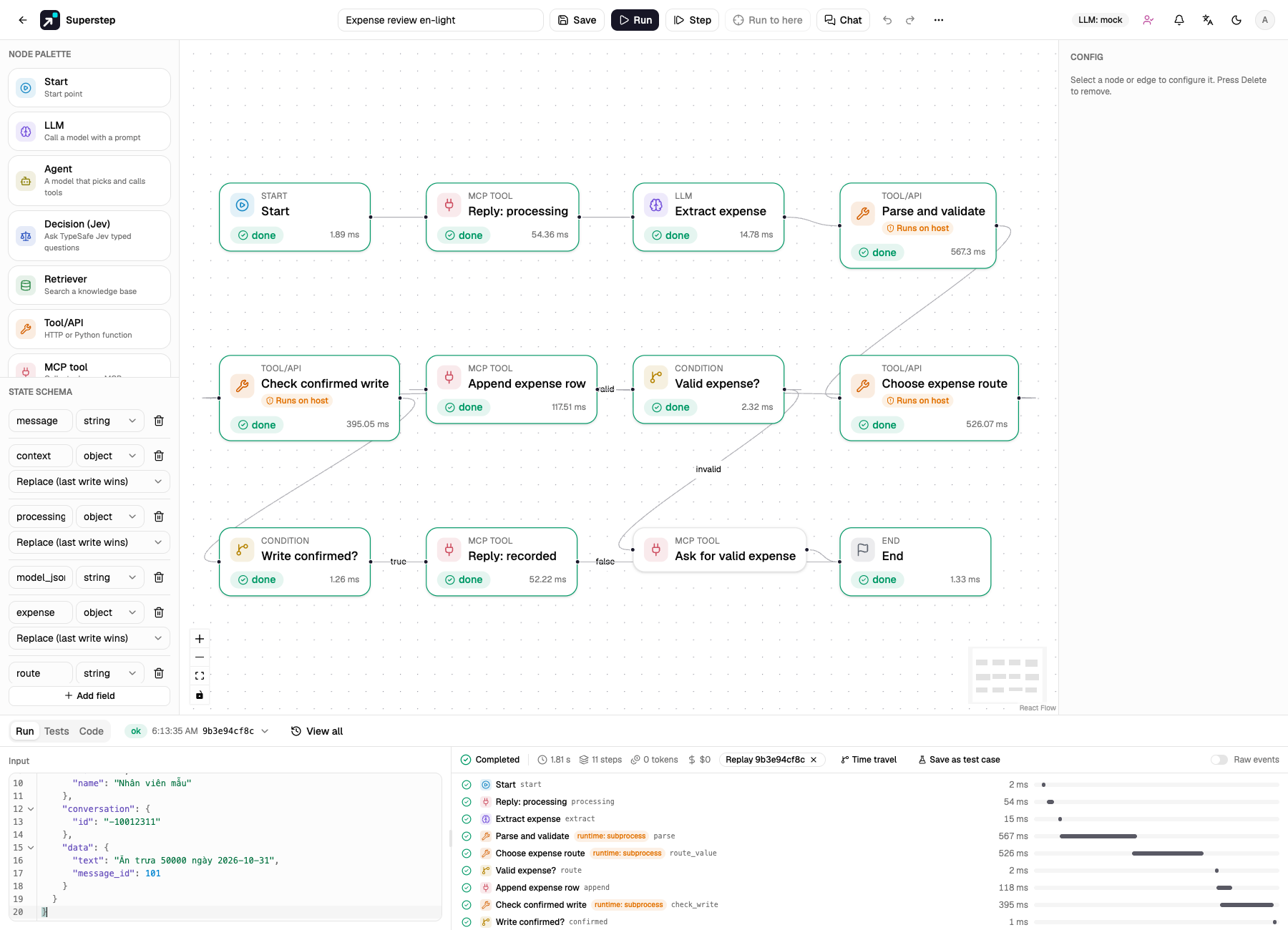
The screenshot is an acceptance run with fake providers and synthetic input.
Prepare the server and account
- An account with
code.write(admin by default) must review and import the Code template. Enable Python Code nodes withSTUDIO_ENABLE_CODE_NODES=1. - Use the documented Docker or remote Code runtime for deployment. The parser uses only Python's standard library and needs no package. The subprocess runtime is used only for trusted local acceptance tests.
- Run the worker, configure a public HTTPS
STUDIO_PUBLIC_URL, and use a separate test bot/sheet while validating. No live credentials belong in template JSON. - Create the primary OpenRouter credential and a fallback Ollama credential under Settings. Choose installed models; the template's model names are examples. Model fallback makes at most two calls per node attempt and does not hide authentication/permission failures.
Connect Telegram and Sheets
- In Settings → Channels, save a Telegram bot connection. The bot must receive ordinary messages in the selected group (configure its privacy mode accordingly).
- In Settings → MCP, create a managed Telegram connection referencing that channel, with the fixed destination chat ID of this group. Discover tools.
- Create a Google service account, enable Sheets API, share a dedicated spreadsheet
with its email as an editor and create an
Expensestab. In Settings → MCP, create a managed Google Sheets connection with that spreadsheet/tab, 7 data columns and the service-account JSON key. Discover tools. - Set up these headers. Keep H intact: it is written by the managed adapter.
| Column | Header | Value |
|---|---|---|
| A | expense_date | YYYY-MM-DD, from the message when supplied |
| B | employee | Authenticated event actor name, falling back to actor ID |
| C | description | Validated model text |
| D | category | Validated model text |
| E | amount_vnd | Positive whole VND amount |
| F | status | Chờ duyệt |
| G | submitted_at | Submission timestamp at UTC+07:00 |
| H | operation_id | Stable operation key added by the adapter |
The original six expense columns are preserved; G records submission time and H supports reconciliation. Values use RAW input, so formula-looking text remains text. Limit this tab to 100,000 rows and retain the ID column.
Bind the imported graph
- On Extract expense, select the primary credential/model and the fallback credential/model. Resource IDs are deliberately blank in the portable file.
- On Reply: processing, Reply: recorded and Ask for valid expense, select the managed Telegram connection.
- On Append expense row, select the managed Sheets connection. Keep its
valuesargument as{{state.expense.values}}. - In ⋯ → Chat triggers, choose the bot connection, the exact group and
An event (run as owner). Set the exact type to
message.text. Enter explicit allowed Telegram sender IDs;*deliberately permits everyone in that group to use the trigger owner's resources without a studio account. - Map state
messagetodata.text, and statecontextto$. Metadata is untrusted data; it cannot choose credentials or tool destinations.
A new import shows validation issues until connections and fallback credentials are selected. Save when those issues are resolved. Do not register a production webhook while n8n still owns the bot.
Data rules and observable failures
The parser accepts a JSON object with boolean is_expense, numeric amount,
description, category and optional expense_date. It accepts optional JSON
code fences but never executes model output. Amount must be a positive whole
number at most 1,000,000,000,000 VND. Numeric strings, booleans and fractional
amounts take the feedback branch. Description/category have bounded lengths.
Adjust these reviewed business rules in Code if your policy differs.
Explicit dates must be YYYY-MM-DD. If no expense date is supplied, use the submission date in Vietnam's UTC+07:00. Submission time remains separate in G; the model cannot overwrite it or the employee identity. Malformed JSON and exhausted model failover appear as errors in History/trace, without a sheet write.
Append has two attempts. After an uncertain first response, the second attempt only reconciles the existing operation; it does not append again. A confirmed matching row may then allow the success reply. Rejection or an unresolved outcome stops before success. Recent operations → Check external result can check later; it does not restart an errored workflow or send a final reply. Do not start a new run to bypass an unresolved write. Inspect the external service first.
A normal workflow test or mock-model run sends no managed messages or writes. The stock model mock does not extract expense JSON; use a controlled provider fixture/canned JSON to exercise this exact business schema. The repository's integration tests mock providers while executing the actual parser in a subprocess.
From backend/, run .venv/bin/python -m pytest -q tests/test_expense_integration.py.
From frontend/, run
E2E_EXPENSE_FIXTURE=1 E2E_CODE_RUNTIME=subprocess npm run e2e -- expense-workflow.spec.ts.
The browser fixture requires that explicit flag and replaces models/Google HTTP;
Telegram uses the local fake API. It performs no live provider writes.
Controlled acceptance and cutover
Check valid expense, missing/negative amount, unrelated text, malformed JSON, primary-model failure, Sheets rejection, lost response and duplicate delivery. Verify that a success message follows one confirmed sheet append, and that dates and actor identity are correct. Inspect run trace and Recent operations as well as the sheet. Duplicate event IDs and a worker replay reuse the recorded effects.
For live migration, pause submissions, let n8n's pending executions finish and reconcile the sheet. Record the last processed update/message boundary. Disable the old workflow, register Superstep's webhook, verify with a controlled new message and resume submissions. Telegram has one webhook per bot. Existing n8n delivery history is not imported: replaying old messages can create new expenses. If rollback is needed, stop the Superstep binding and restore the old callback after reconciling operations. Registration and real writes require operator approval; the example's tests never perform this cutover.