Roles and sharing
Roles
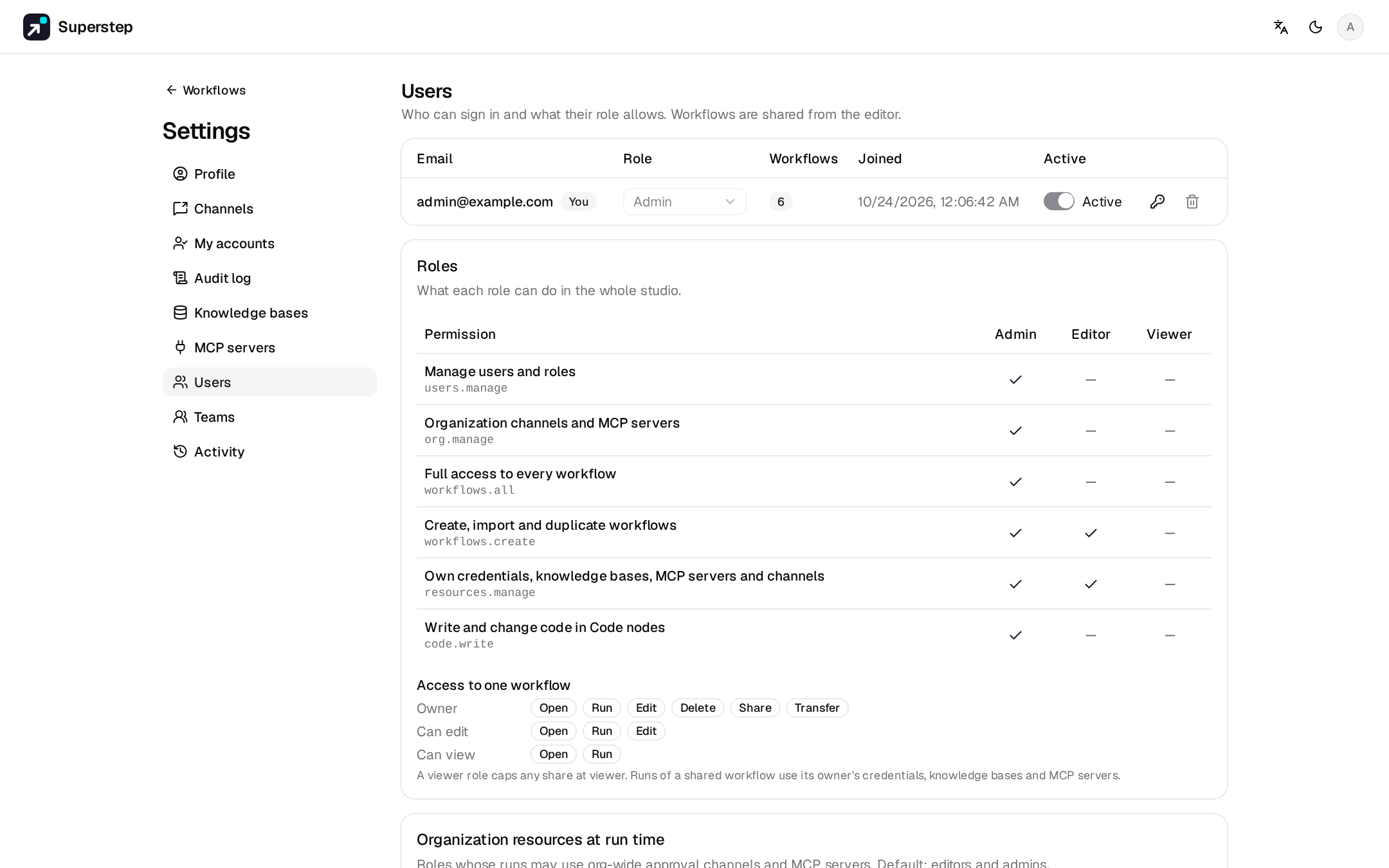
| Role | Can |
|---|---|
admin |
Everything, including users, roles, teams, the activity log, organisation templates and channels, and Code nodes (code.write). |
editor |
The default. Create workflows, credentials, knowledge bases, MCP servers and personal channels. |
viewer |
Open and run what was shared with them. |
Settings → Users shows the full permission matrix and changes roles.
- Role changes and disabling an account apply at once, including open sockets.
- You cannot change your own role or disable yourself, and one active admin must remain.
STUDIO_ADMIN_EMAILSis only a bootstrap: those addresses become admin at sign-up, and at start-up only when no active admin remains.STUDIO_DEFAULT_ROLE=viewermakes new accounts view-only.- There is no SSO.
Sharing a workflow
⋯ → Share (owner or admin) adds an e-mail as viewer or editor, or shares with a whole team (Settings → Teams). The effective right is the highest of the direct share and the team shares.
| Right | Open | Run | Edit | Delete | Share | Transfer |
|---|---|---|---|---|---|---|
| Owner | ✓ | ✓ | ✓ | ✓ | ✓ | ✓ |
| Editor share | ✓ | ✓ | ✓ | |||
| Viewer share | ✓ | ✓ |
Admins act as owner on every workflow. A user whose global role is viewer
never edits, even with an editor share. Viewers see a read-only editor. A shared run uses the owner's credentials,
knowledge bases, MCP servers and subgraphs. The owner and admins see every
run; everyone else sees their own.
Transfer ownership
⋯ → Transfer ownership requires the recipient to be an editor or admin. Resources the recipient cannot use (credentials, knowledge bases, MCP servers, channels) can be reassigned, or kept and flagged.
Organisation resources
Admins choose which roles may use organisation approval channels and
organisation MCP servers at run time (admins and editors by default).
Creating them, and registering stdio MCP servers, needs org.manage.
Activity log
Settings → Activity is the admin audit log: role changes, shares, transfers, password changes, and system events such as the first Code call that runs on host (directly on the server) after a start.
Deleting a user
Deleting a user anonymises them and keeps their runs, or deletes the runs too. Their workflows must be transferred first.