Public API and SDKs
For the published chat's HTTP and streaming API, see Chat API and Third-party authentication. The SDK helpers below cover workflow runs and headless chat. Chat support is available in the repository ahead of the next owner-approved package release.
Other services start a workflow over HTTP with a workflow token, then poll for the result. This page covers the two public endpoints, the official Python and TypeScript SDKs, and the errors to handle. For callbacks, signatures and deliveries, see API triggers and webhooks. Every field is in the Public API reference.
Concepts
| Term | Meaning |
|---|---|
| Workflow token | A secret wft_... that starts runs of one workflow. Send it as X-Workflow-Token: wft_... or Authorization: Bearer wft_.... Besides these endpoints it only works with the LangGraph-compatible API and the MCP server of the same workflow. |
| Run | One execution of the workflow's latest saved version. input is its initial state. |
| Status | queued and running while it goes; then ok, error, cancelled, timeout, waiting (paused at a Human node) or expired. |
| Envelope | Every response is {"success", "data", "error"}. On failure error.code is a stable code; error.message is English for logs. |
| Method and path | Operation | Purpose |
|---|---|---|
POST /api/hooks/workflows/{wid}/runs |
startRun |
Start a run. 202 with poll_url and a Location header, or 200 with the result in sync mode. |
GET /api/hooks/workflows/{wid}/runs/{run_id} |
getRun |
Status and, once finished, final_state, error, metrics. |
Create a token
- Open the workflow in the editor and save it.
- Open ⋯ → API, enter a name and select Create token.
- Copy the token (
wft_...) and the signing secret (whsec_...). Each is shown once; store them in your secret manager.
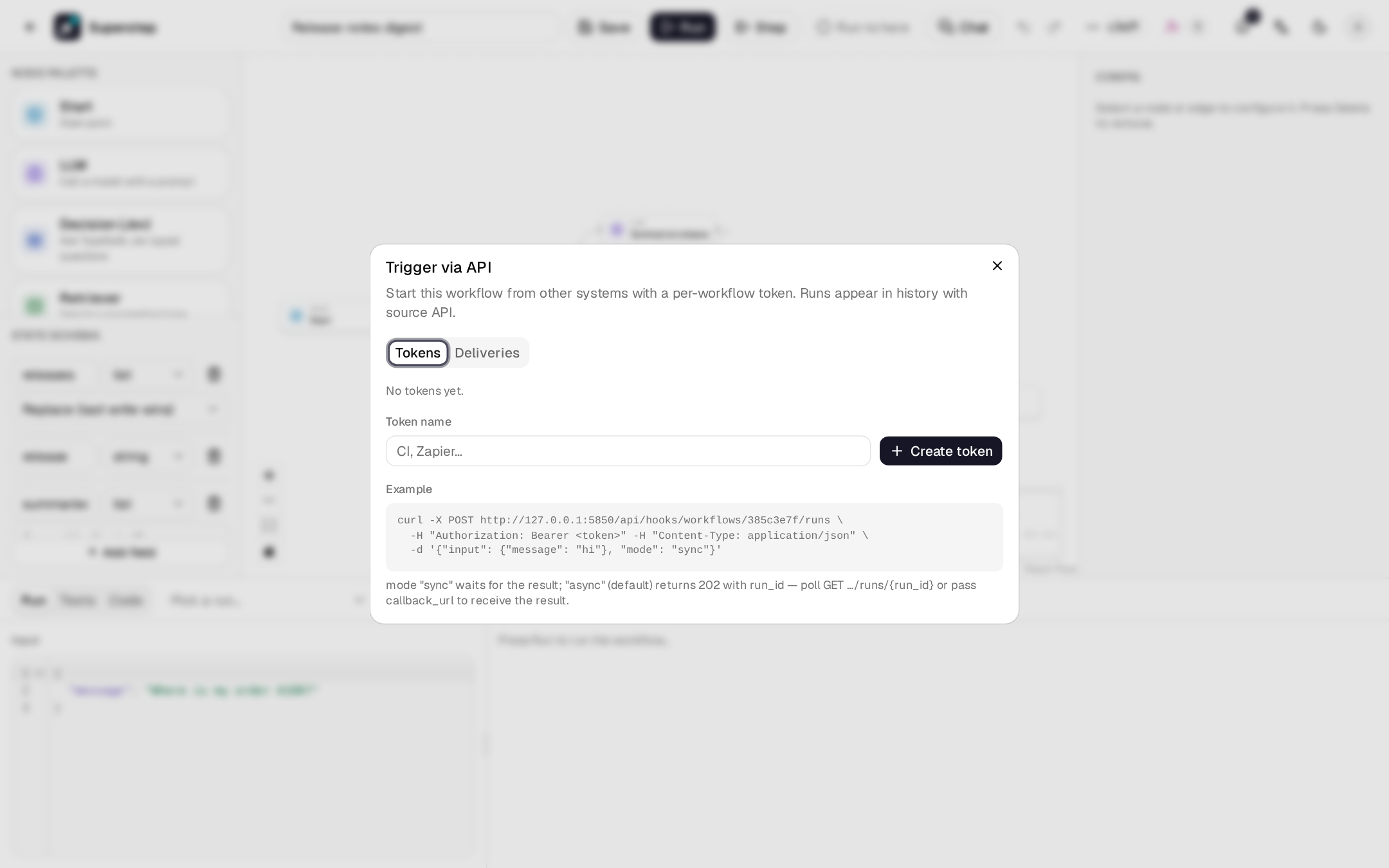
Only the workflow's owner, or an admin, can create tokens. Revoke a token in
the same dialog; requests with it then fail with 401 TRIGGER_TOKEN_INVALID.
The workflow id (wid) is the last part of the editor URL.
Start a run
The answer is 202 Accepted:
{
  "success": true,
  "data": {"run_id": "3f9c2a1b7d", "status": "queued",
           "poll_url": "https://superstep.example.com/api/hooks/workflows/example/runs/3f9c2a1b7d"},
  "error": null
}
| Body field | Meaning |
|---|---|
input |
The initial state, a JSON object (default {}). |
mode |
async (default) answers at once. sync waits up to STUDIO_SYNC_WAIT_MAX seconds (default 30) and answers 200 with the result; a run still going then answers 202 with the current result and poll_url. |
callback_url |
Optional public URL that receives the result when the run ends. See Verify callbacks. |
Poll for the result
{
  "success": true,
  "data": {
    "run_id": "3f9c2a1b7d", "workflow_id": "example", "status": "ok", "source": "api",
    "final_state": {"intent": "order_status"}, "error": null, "waiting": null,
    "metrics": {"duration_ms": 412.0, "tokens_in": 0, "tokens_out": 0, "cost_usd": 0.0, "error_count": 0},
    "trace_url": null, "started": 1761292800.0, "ended": 1761292800.4
  },
  "error": null
}
Poll every second or two and back off for long runs; polling is not rate
limited. A run that ends in error carries the failing node's error in
error; one in waiting names the Human node and its prompt in waiting.
A run waiting for a workflow tool's
child run has waiting.child_run_id instead, and a child run has
parent_run_id.
Run and wait
run_and_wait (Python) and runAndWait (TypeScript) start a run and poll
until it is done. The poll interval starts at 1 s and grows by 1.5 times up to
10 s. They return the run whatever its final status, so check status; after
timeout they raise WaitTimeoutError carrying the last state.
from superstep import Client, WaitTimeoutError

client = Client()  # SUPERSTEP_WORKFLOW_ID, SUPERSTEP_TOKEN, SUPERSTEP_BASE_URL
try:
    run = client.run_and_wait({"message": "hi"}, timeout=120, poll_interval=0.5)
except WaitTimeoutError as err:
    print("still", err.run.status)
else:
    print(run.status, run.final_state)
AsyncClient has the same methods as coroutines:
import { Superstep } from '@superstep/sdk'

const client = new Superstep() // SUPERSTEP_WORKFLOW_ID, SUPERSTEP_TOKEN, SUPERSTEP_BASE_URL
const run = await client.runAndWait(
  { message: 'hi' },
  { timeoutMs: 120_000, pollIntervalMs: 500, signal: AbortSignal.timeout(130_000) },
)
console.log(run.status, run.final_state)
Install the SDKs
| Language | Install | Source |
|---|---|---|
| Python 3.9+ | pip install superstep |
sdk/python |
| TypeScript, Node 18+ | npm install @superstep/sdk |
sdk/typescript |
Both read SUPERSTEP_BASE_URL, SUPERSTEP_TOKEN and SUPERSTEP_WORKFLOW_ID
when an option is not passed. Until the first release, install them from a
checkout: pip install ./sdk/python, or npm install ./sdk/typescript.
Headless chat
Use new Superstep({baseUrl}).chat(slug, {getToken}) in TypeScript, or
Client(base_url=...).chat(slug, token=...) / AsyncClient in Python. These
clients read sessions/history, stream typed events and a final result, answer
Human text/form questions, upload files and rate answers. Sign short-lived
user tokens in your own backend with @superstep/sdk/server mintChatToken
or Python mint_chat_token; the app-key secret stays on that backend.
For the current source version, build the TypeScript SDK before using its
local package; install Python with pip install './sdk/python[chat]' for
socket support. The TypeScript README
and Python README
describe callback refresh, explicit cancellation and bounded history recovery
without automatically replaying an ambiguous message.
The chat host example demonstrates a loopback Node host on a separate origin, server-owned sessions, two customers, a Human approval form, files, ratings and key revocation. It serves a headless SDK portal, React toolkit page and widget page with the same protected token endpoint. It is a local sign-in demonstration; replace its stub before deploying an account system. CI keeps screenshots as downloadable artifacts, outside Git.
TypeScript targets SDK 0.2.0. Python retains the SDK/CLI/server's shared version until the next approved release; no Python downgrade to 0.2.0 is planned. Package publication and release tags require the owner's release approval.
Errors
Errors use the envelope and a stable code:
{"success": false, "data": null,
 "error": {"code": "TRIGGER_TOKEN_INVALID", "message": "Missing, invalid or revoked workflow token", "details": null}}
| HTTP | Code | Cause | Python / TypeScript error |
|---|---|---|---|
| 401 | TRIGGER_TOKEN_INVALID |
Missing, wrong or revoked token, or a token of another workflow | AuthenticationError |
| 404 | RUN_NOT_FOUND |
Unknown run, or a run of another workflow | NotFoundError |
| 400 | RUN_INPUT_INVALID |
input is not a JSON object |
InvalidRequestError |
| 400 | CALLBACK_URL_INVALID |
callback_url is not a public http(s) URL |
InvalidRequestError |
| 422 | VALIDATION_ERROR |
Malformed body; details lists {field, message} |
InvalidRequestError |
| 413 | RUN_INPUT_TOO_LARGE |
input is over STUDIO_INPUT_MAX_BYTES (default 256 KB) |
PayloadTooLargeError |
| 429 | RATE_LIMITED |
Too many runs started with this token | RateLimitError (retry_after / retryAfter) |
| 500 | INTERNAL_ERROR |
Server error | ServerError |
The SDKs also raise APIConnectionError (network failure, or a response that
is not the envelope), WaitTimeoutError and ConfigError. All codes are in
Error codes.
Rate limits
Each token may start STUDIO_TRIGGER_RATE_LIMIT runs per
STUDIO_TRIGGER_RATE_WINDOW seconds (default 60 per 60). Over the limit the
answer is 429 RATE_LIMITED with a Retry-After header in seconds. Polling
is not limited. With Redis the counter is shared by all API processes;
without it each process counts on its own.
OpenAPI
The public endpoints have their own spec, without the studio's internal API:
| Where | What |
|---|---|
/openapi.public.json on a running server |
The public spec |
/docs/public on a running server |
Swagger UI for the public spec |
docs/api/openapi.public.json in the repository |
The committed copy the SDKs are generated from |
| Public API reference | The spec rendered in this handbook |
Generate a client in another language from that file with any OpenAPI generator.