Agent node
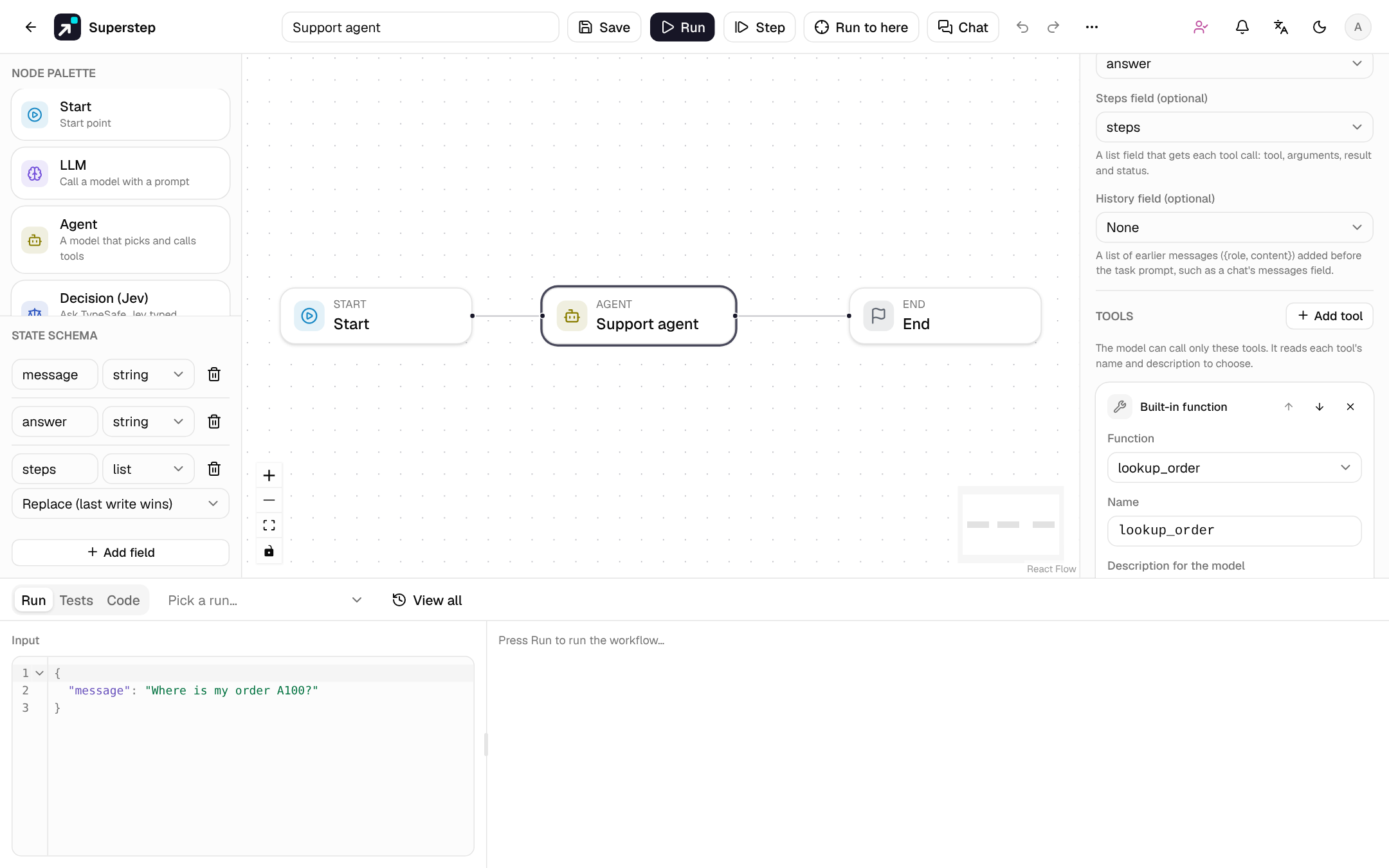
An Agent node gives a model a task and a list of tools. The model decides which tool to call and with which arguments, reads the result, and repeats until it answers. You choose the tools, the number of rounds, and which calls need a person's approval first.
When to use it
| Use | When |
|---|---|
| Agent node | The order of the steps depends on the request: "look up the order, then check the refund policy, then answer", but only when the customer asks about a refund. |
| A fixed graph (LLM, Tool, MCP tool, Retriever, Condition nodes) | Every run takes the same steps, or each branch must be drawn and reviewed. The graph decides; the model only fills in text. |
| Subgraph | A fixed part of the graph is shared by several workflows. |
| A workflow as a tool | The model should decide whether and when another workflow runs: one agent hands work to smaller, focused agents. |
An Agent node is one node on the canvas. Put it inside a larger graph: a Condition after it can branch on its answer, and a Human node after it can approve the whole result.
Settings
The settings sit in the Config tabs: credential, model, prompts, tools and approval in Settings; the output, steps and history fields in Data; max rounds and retry/timeout in Execution.
| Setting | Notes |
|---|---|
| Credential, Model | As for the LLM node. Blank uses OPENAI_API_KEY, and without that the offline mock. The provider must support tool calling: OpenAI, Anthropic, OpenRouter, Ollama, LM Studio and OpenAI-compatible servers do. |
| System prompt | Optional. A template with {{state.field}} references. |
| Task prompt | Required. A template, for example Help this customer. Message: {{state.message}}. |
| Max rounds | 1–25, default 5. See Rounds and the limit. |
| Output field | Receives the final answer. |
| Steps field | Optional, a list field. Receives every tool call: {tool, args, result, status, ms}, plus approval when a person answered. |
| History field | Optional, a list field of {role, content} messages (user or assistant) added before the task prompt, such as a chat's messages field. A chat's field ends with the new message; when the task prompt already contains it (for example {{state.message}}), the Agent leaves that last item out, so the model gets the message once. |
| Include attachments | Adds the chat's files to the task message, as on the LLM node. See Attachments. |
| Tools | At least one. See below. |
| Approval | Shown when a tool needs approval: channel, approvers and deadline, as on a Human node. |
| AI review | Shown with Approval: a model can review each tool call first (suggest, or answer automatically). See AI review of approvals. |
| Execution | Retry, wait between tries and timeout apply to each model call and each tool call. A cache TTL is never used for them, since a cached step would skip a call or an approval. |
Tools
Add tool picks the source. Every tool has:
- a name the model calls it by: 1–64 letters, digits,
_or-, unique in the node; - a description for the model: what it does and when to use it. The model chooses from the names and descriptions, so write them for the model;
- a Needs approval switch.
Up and down arrows set the order the model sees.
A tool of one of your MCP servers. Its input schema comes from the server's tool list, so the model knows the arguments. A shared workflow runs with the owner's MCP servers.
Method, URL and an optional body, plus the parameters the model fills
(name, type, description, required). Use {{state.args.<name>}} in the URL
or body to insert a parameter. Without a body, POST, PUT and PATCH send the
parameters as JSON, and GET adds them to the URL. The model's arguments are
inserted as values and never rendered as templates, so an argument cannot
read other state fields.
The request follows the HTTP Tool rules: public
addresses only unless STUDIO_HTTP_TOOL_ALLOW_PRIVATE=1, no redirects,
STUDIO_HTTP_TOOL_TIMEOUT, and an Idempotency-Key header for each call.
A Python function registered in backend/app/engine/tools.py, for example
lookup_order. Its parameters come from the registry. The function gets
the state with the model's arguments on top.
One of your knowledge bases and top_k (1–20, default 4).
The model writes the search query and gets the best passages.
A saved workflow, run as its own run. Pick the workflow, then the state fields the model fills (Parameter) and the fields of its final state the model gets back (Result). See Workflows as tools.
Before a call runs, its arguments are checked against the tool's parameters (required parameters and JSON types). An unknown tool, invalid arguments or a tool that fails gives the model an error as the result, so it can try again or answer without it. Results go back to the model shortened to 8,000 characters; the trace and the steps field keep 2,000.
Workflows as tools
A tool can be another saved workflow. If that workflow has its own Agent node, it is a specialist agent and the calling Agent is its supervisor. Several agents work together this way, with no new node type, and each one is built and tested on its own canvas.
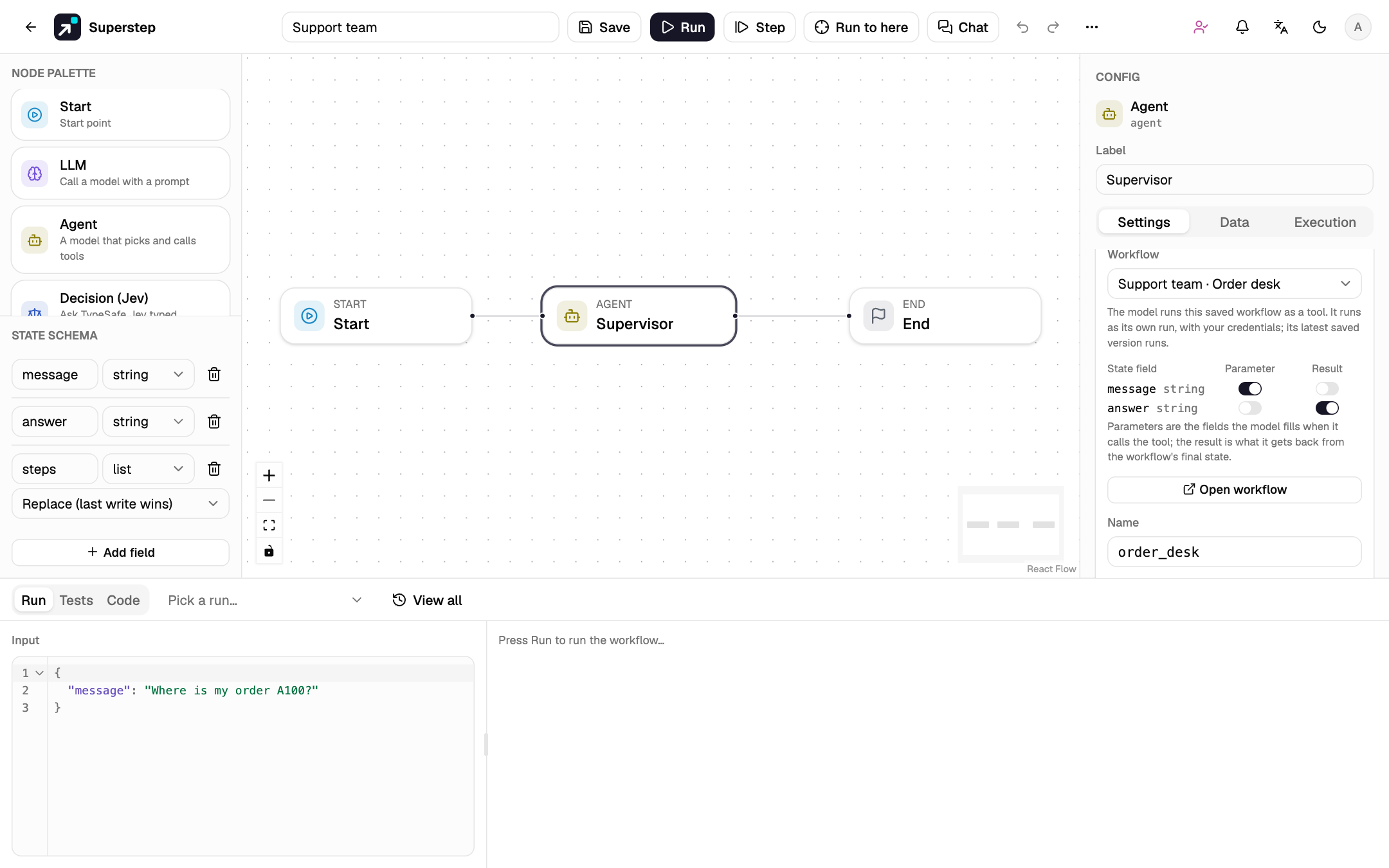
- Picking the workflow names the tool after it and picks
messageas the parameter andansweras the result when the workflow has those fields (the usual chat shape). Change them with the switches; at least one result field is required. Open workflow opens it in the editor. - What runs. Each call starts a child run of the workflow's latest saved version, taken when the calling run starts. The child has its own record, history and checkpoints, and uses the caller's credentials, MCP servers and knowledge bases. The model gets the result fields as JSON; a child that fails gives the model an error, and the agent goes on.
- Waiting. While the child runs, the calling run waits, as at a Human node. Its run panel shows Waiting for another workflow with a link to the child run; nobody answers there. When the child ends, the calling run goes on by itself, also after a restart of the server: a call that already ran is never run again.
-
Approvals inside the child are passed up. A Human node, or an Agent tool that needs approval, inside the child waits as usual; the Approvals page and the channels name both workflows, for example
Support team › Refund desk: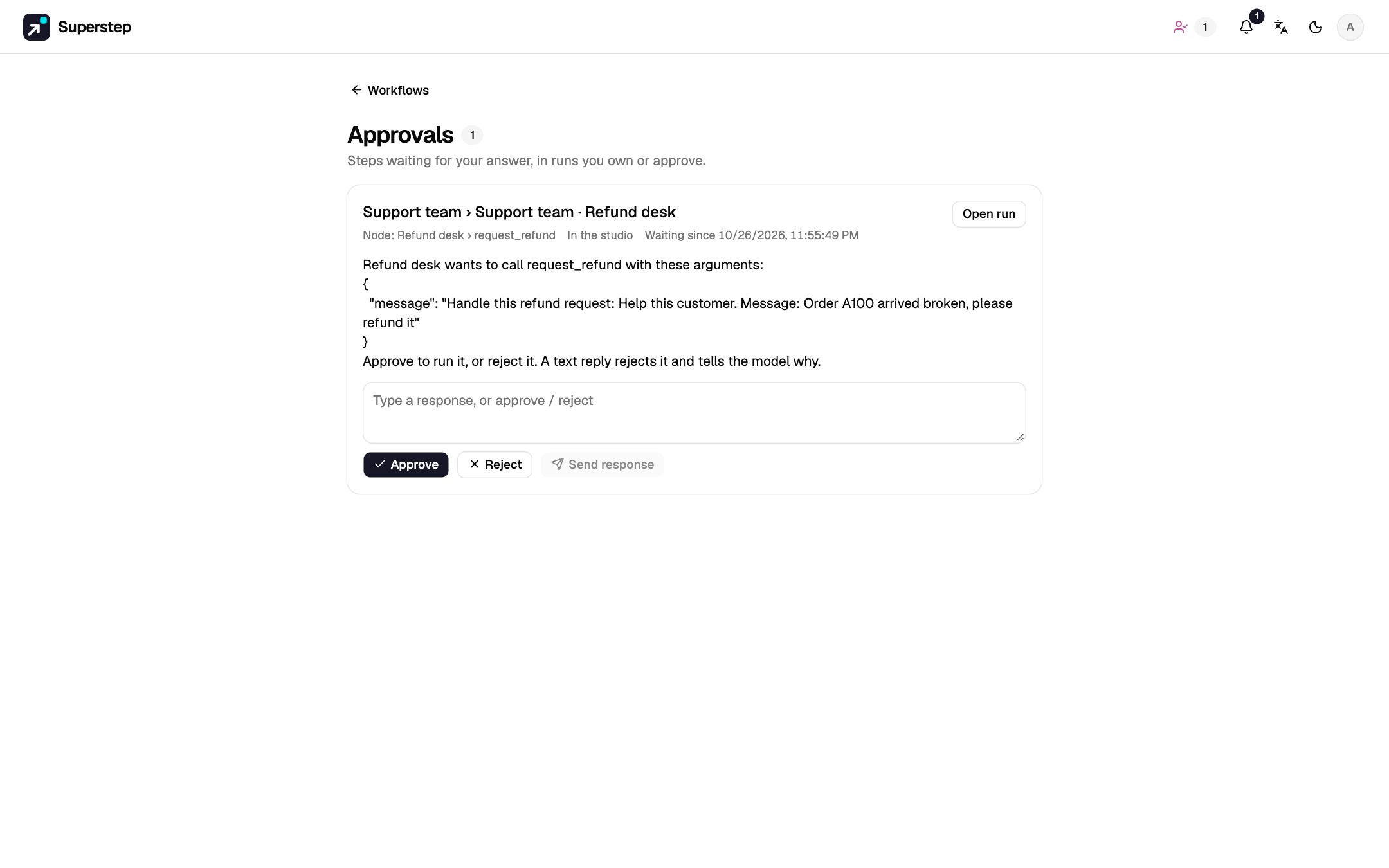
-
Trace. The tool call shows the child's steps under it, with Open run. The child run's own trace starts with Called by and a link back. Its tokens and cost count on the calling Agent node.
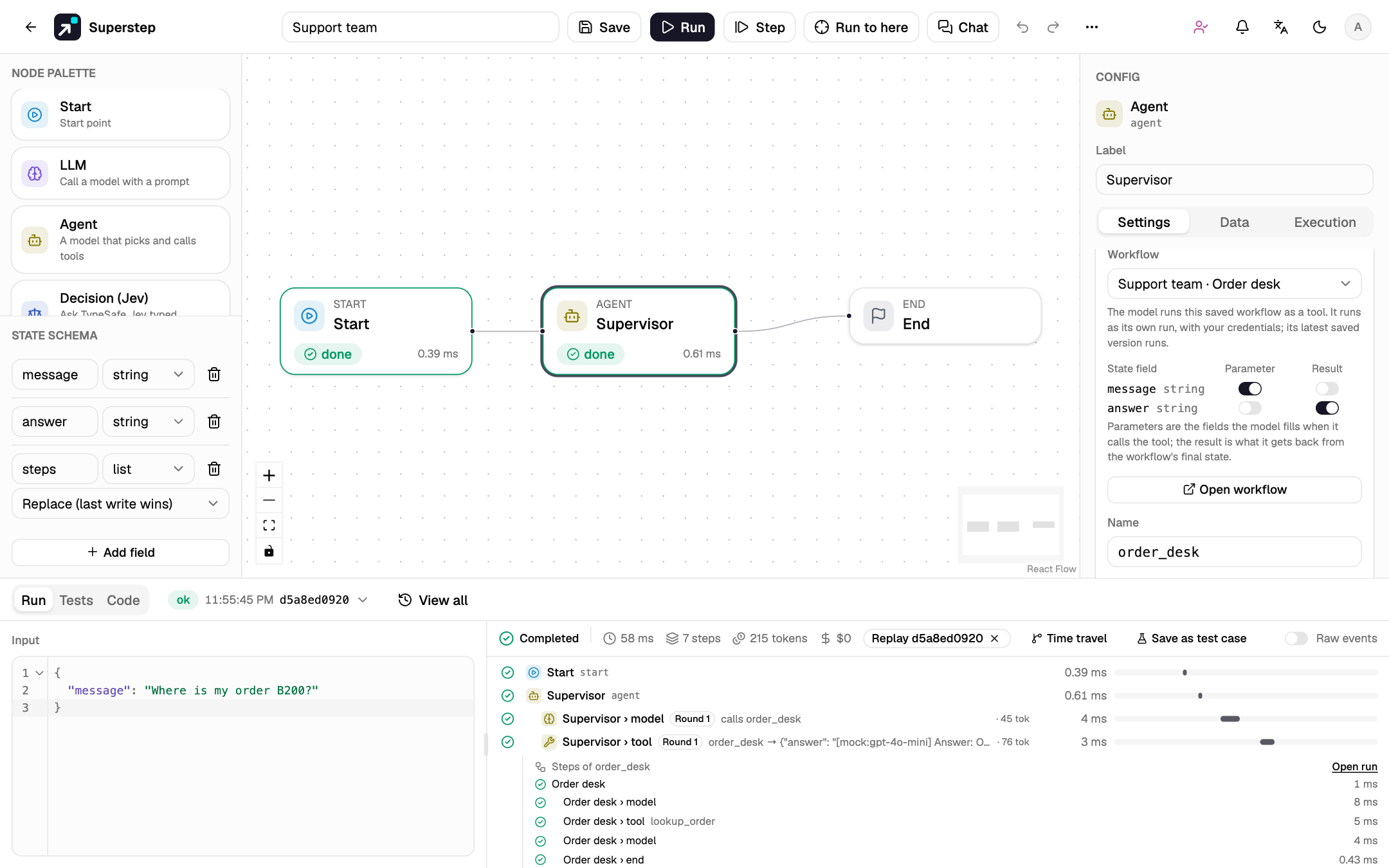
-
Limits. Workflow tools and subgraphs nest at most 5 levels, and a workflow cannot call itself through a chain of tools or subgraphs: saving says so. Cancelling the calling run cancels its child. A workflow used as a tool cannot be deleted without Delete anyway, as for subgraphs.
Rounds and the limit
One round is a model call plus the tool calls it asks for. Calls in one
round run together, and their results go back to the model in the model's
order. The default is 4 at a time (STUDIO_AGENT_PARALLEL_TOOLS, from 1 to 8).
Run tool calls in parallel on the Agent node turns that off for one node,
so its calls run one after another. At most 8 run, and the others get
"refused" as their result. A call that fails, or one that waits for approval
or for another workflow, does not stop the other calls. The run continues
once every wait in the round is done. The trace draws the calls of a round
as bars that start together.
The loop ends when the model answers without calling a tool. When Max rounds is reached, the model is called once more without tools to give its final answer, and the trace marks round limit reached.
Approval before a tool
Turn on Needs approval for a tool that changes something: a refund, an
e-mail, a write to another system. Before each call to it, the run pauses in
status waiting, as at a Human node:
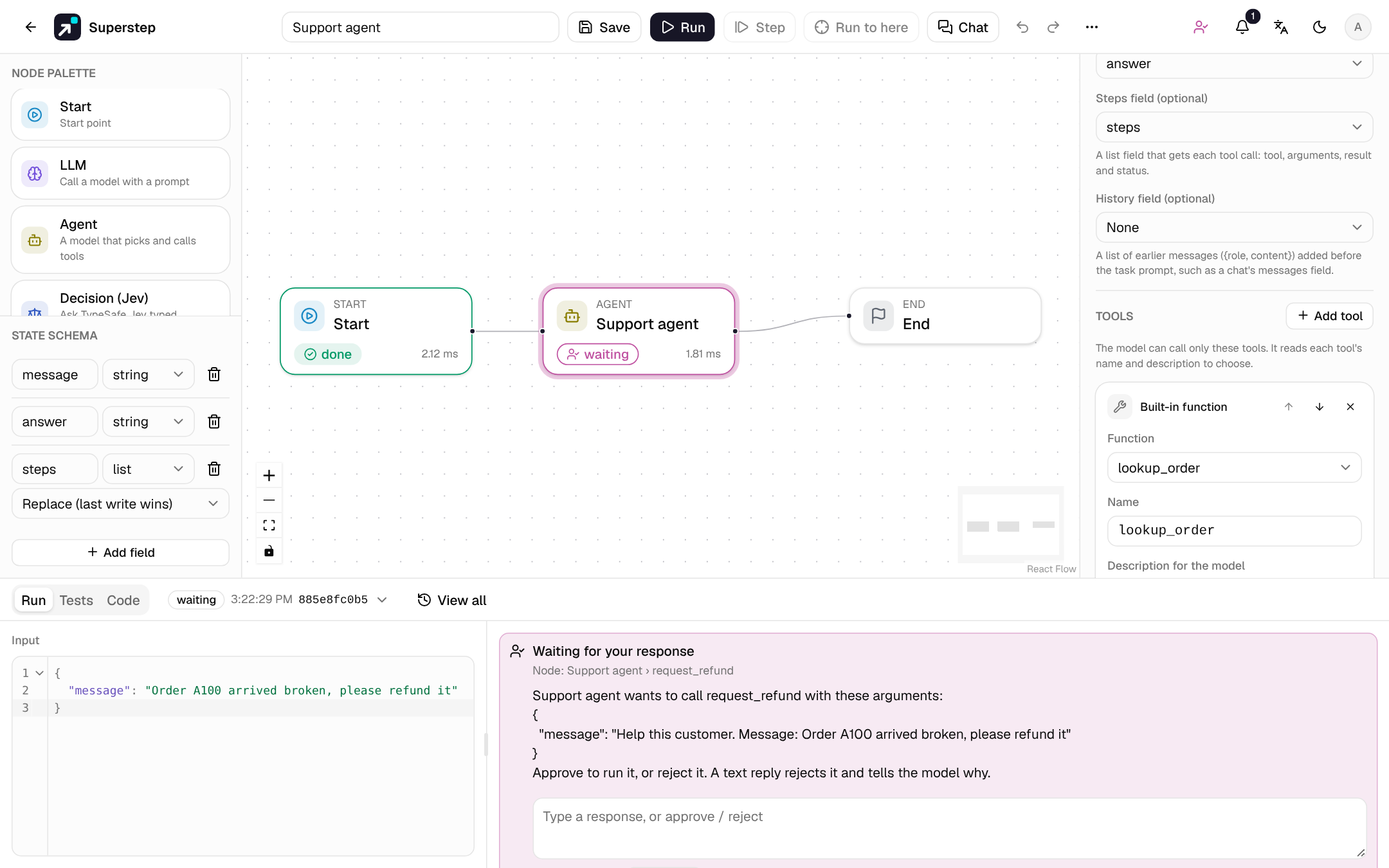
- The question names the Agent node and the tool, and shows the arguments. The
step is called
Agent › tool, for exampleSupport agent › request_refund. - Approve runs the call. Reject tells the model "Rejected by a reviewer". A text reply also rejects the call, and the model gets the text as the reason, so it can answer differently.
- The request reaches the same places as a Human node's: the run panel, the Approvals page, and the approval channel (Slack, Telegram, WhatsApp, email or Teams) with the approvers and deadline set on the Agent node. A deadline's timeout answer works the same way.
- Each call asks again; an approval covers one call. A call with an unknown tool or invalid arguments never runs, so it is not shown to an approver.
- In a chat, the person chatting cannot approve the agent's own actions: a reviewer answers in Approvals.
The offline mock
Without a credential and OPENAI_API_KEY, in the public demo, and in test runs
with Use the offline mock model, the model is a deterministic mock. It
calls the tool whose name and description share the most words with the task
(the first tool on a tie), filling text parameters with the task, then answers
with the tool's result. Templates, tests and demos run offline with it, and
approvals still ask.
Trace and usage
The run trace groups the Agent node's steps under it, by round:
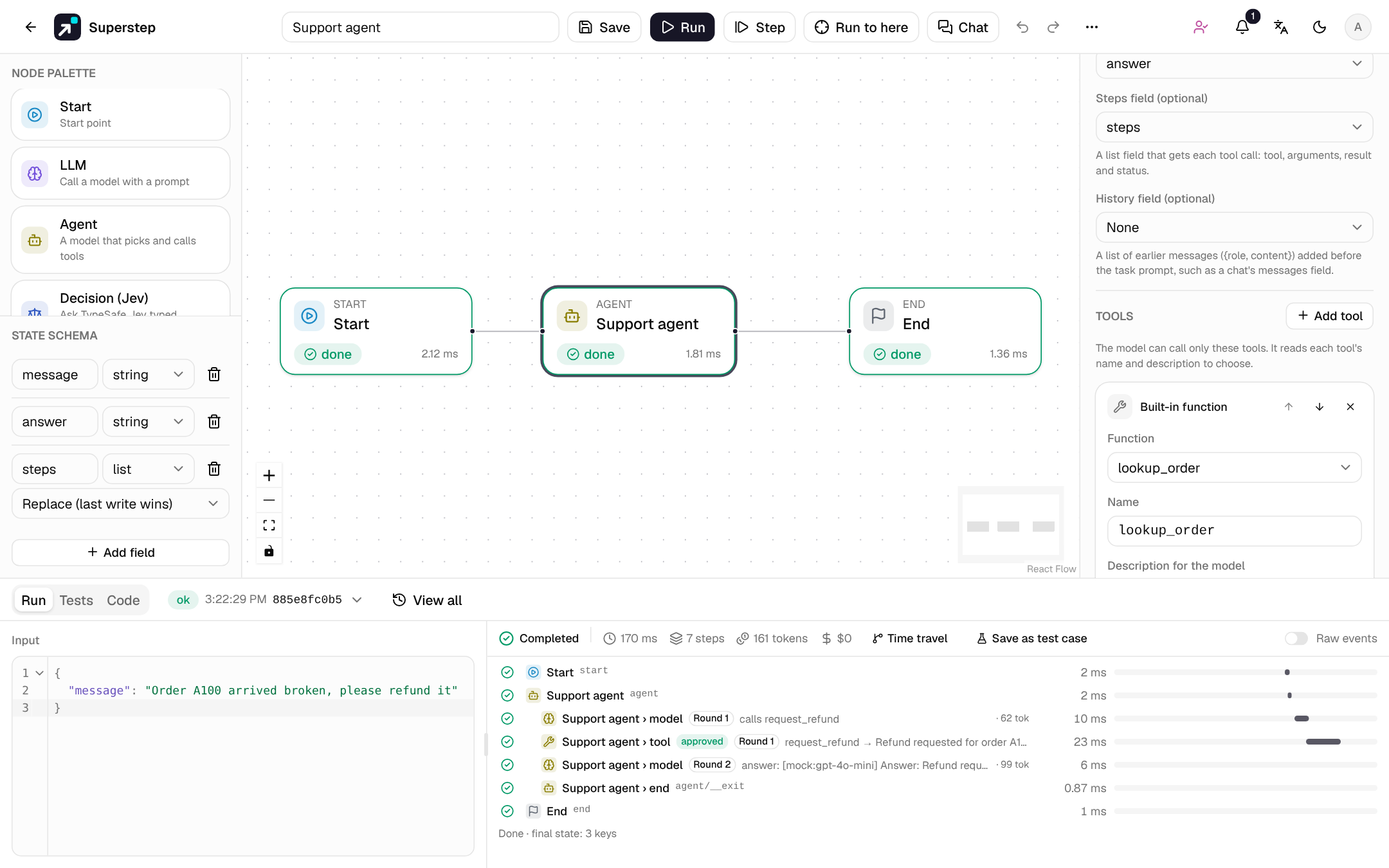
Agent › modelshows the round, the tools it called or its answer, and its tokens.Agent › toolshows the tool, a shortened result, the duration, and approved or rejected by a reviewer when a person answered.- The node's token usage and cost add up in the run.
Each model call and each tool call is its own step with its own checkpoint. A pause, a restart or a worker crash repeats at most the step that had not finished: tools that already ran are not called again (see Runs across restarts). Time travel can fork a run between two steps of the loop.
In a chat, Steps shown to visitors set to Step names lists each tool
call, for example Support agent › lookup_order; Full also shows the model
calls, with each step's input and output.
Test an Agent node
In the Tests tab:
- the Tool called check passes when the Agent node called a tool, or did not. A call counts when it ran, even if the tool failed; a rejected, refused or invalid call does not;
- an Agent node with a tool that needs approval is listed under Human answers: give Approve, Reject or a text reply for each call, in order.
In a test run, a called workflow runs with the same test rules (the offline mock when chosen, e-mail dry runs). A question for a person inside it is not answered by the test: the child is cancelled and the tool call fails, which the Tool called check can still see.
The Support agent template
Support agent in the template gallery has one Agent node
with three tools: lookup_order, a refund policy search (pick a knowledge base
first), and request_refund, which needs approval and is rejected after one
day without an answer. Its test cases check an order question, an approved
refund and a rejected one. request_refund is an example: it pays nothing.
The Support team template
Support team shows the supervisor pattern. Using it creates three
workflows: the supervisor, Order desk (an Agent with lookup_order) and
Refund desk (an Agent with request_refund, which needs approval). The
supervisor has two workflow tools, order_desk and refund_desk, and hands
each question to the desk that handles it. Its test cases check that an order
question goes to the order desk and a refund request to the refund desk.
The Help desk template
Help desk shows agent hand-offs. Triage answers order
questions with lookup_order and hands billing questions to Billing and
technical problems to Technical; Billing can hand a technical problem to
Technical. The hand-off limit is 3. Its test cases check that an order
question stays with Triage, a duplicate charge goes to Billing and a crash to
Technical. In a chat, the next message stays with the agent that answered.
Export
- Python and the LangGraph project (see
Export to Python): the Agent node becomes
the same steps as in the studio, with
interrupt()before a tool that needs approval. WithoutLLM_PROVIDERthe file uses the same mock. - TypeScript (LangGraph.js): the same steps, with the same mock and
interrupt(). MCP and knowledge base tools call stubs, as in the Python file. Built-in tools are Python functions of the server, so they throw: the model is told the tool failed, and you port them to TypeScript. - Workflow tools, in all three: each called workflow is written as its own graph in the same file, once, and the tool function invokes it with the parameter fields and returns the result fields. A question for a person inside it pauses the calling graph.
Errors
| Code | When |
|---|---|
AGENT_TOOLS_UNSUPPORTED |
The credential's provider cannot call tools (TypeSafe, SMTP). The model step fails when it runs. |
WORKFLOW_INVALID |
A run of a workflow the editor marks invalid: no task prompt, no tool, max rounds out of range, a tool without its settings (server and tool, function, knowledge base, URL or workflow), two tools with one name, or a steps or history field that is not a list. For workflow tools also: a workflow that is missing or not shared with you, an imported (code) workflow, a cycle, more than 5 levels, or a parameter or result field the workflow does not have. |
AGENT_HANDOFF_TARGET_INVALID |
A hand-off target is not another Agent node of this workflow, or is listed twice. See Agent hand-offs. |
AGENT_HANDOFF_LIMIT |
The workflow's max_handoffs is not a whole number from 0 to 20. |
WORKFLOW_TOOL_TOO_DEEP |
At run time, workflow tools are nested more than 5 runs deep; the call is not started and the model gets an error. |
All codes are in Error codes.