Export to Python
The Code tab in the editor shows the workflow as one LangGraph Python file: the state, one function per node, and the graph built from them. Use it to see how a graph on the canvas is written in code, or to carry a prototype into your own project. It can also write the graph as LangGraph.js TypeScript: see TypeScript (LangGraph.js).
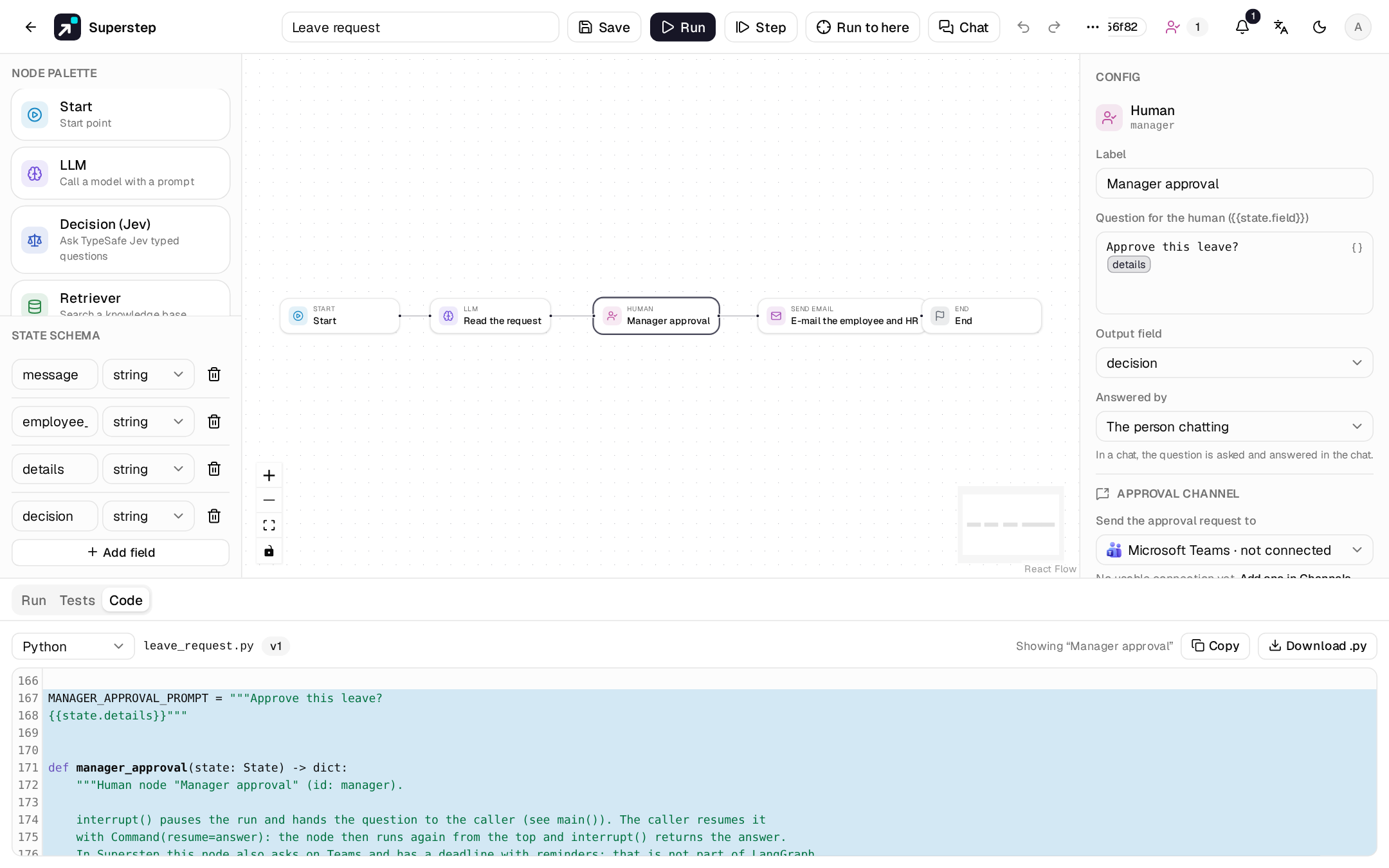
Open the code
- Open the Code tab in the bottom panel, or choose View as code in the ⋯ menu or the command palette (Ctrl+K).
- The tab shows the latest saved version. Unsaved changes are marked and appear after Save.
- Select a node on the canvas: its code is highlighted and scrolled into view.
Start and End point at their
STARTandENDedges. - Copy puts the whole file on the clipboard; Download .py saves it, named after the workflow.
- Anyone who can open the workflow can see its code. Imported LangGraph repositories are code already and have no Code tab.
Run the file
The file needs nothing from Superstep. It runs the example input (the first test case's input when the workflow has one) and prints what each node returned, then the final state:
[read_the_request] {"details": "[mock:gpt-4o-mini] Answer: I'd like leave ..."}
>> manager_approval: approved
[manager_approval] {"decision": "approved"}
(e-mail not sent) to bo@example.com: Your leave request: approved
...
Final state: {...}
-
Models. LLM nodes use an offline mock by default: no API key, no cost, the same answers every time. To call a real model, install LangChain and a provider package and name the provider:
LLM_PROVIDERis any providerinit_chat_modelknows (openai,anthropic,ollama, …); the node's model name is used as written. - Human nodes and approvals.EXAMPLE_ANSWERSholds the answers from the first test case, also for an Agent node's tool approvals. When a node has no answer left, the file asks on the terminal. - Code nodes run as written, in your Python process, without the studio's sandbox. Read them before running a file someone else shared.
From the canvas to the code
| Canvas | Code |
|---|---|
| State fields | class State(TypedDict, total=False); a reducer is Annotated[type, reducer] |
| Start and End | START and END in the edges |
| LLM | render(PROMPT, state), then call_llm(prompt, model) |
| Condition | a node that changes nothing, and add_conditional_edges with a router function and a label → node map |
| Human | interrupt(...) pauses the run; Command(resume=answer) continues it |
| Agent | an entry, a model and a tool function with two routers, and an end function; interrupt(...) before a tool that needs approval |
| Join | a node, and add_edge([branch, branch], join): it runs once all branches finished |
| For each | a loop position field and a router that returns each or done |
| Decision | decide(text, question) for each question |
| Subgraph | the child workflow as its own graph, build_<child>(), added as a node |
| Tool: function | the function's code, copied in |
| Tool: HTTP | an httpx request |
| Tool: Code | the node's code, inside the node function |
| Retriever, MCP, Send email | stubs with a TODO: they need studio services (also for an Agent node's knowledge base and MCP tools) |
| Note | a comment |
| Retry, cache, input fields | RetryPolicy, CachePolicy, input_schema on add_node |
| Timeout | a comment: LangGraph cannot stop a node that blocks |
Node functions are named after their labels (Read the request →
read_the_request). A name that clashes with a state field or a Python name
gets _node, for example decision_node.
State and reducers
class State(TypedDict, total=False):
    feedback: list
    item: str
    labelled: Annotated[list, append_items]
    report: str
    sent: dict
    loop_each_piece_of_feedback: int  # loop position of a For each node
From the Customer feedback digest template. A node returns only the fields it
changes, and LangGraph merges them into the state. A field without a reducer is
replaced; labelled collects one label per piece of feedback.
A Condition
From the Router template:
def route_route(state: State) -> str:
    """The branch to take after "Route": the edge label that state["intent"] names."""
    value = state.get("intent")
    ...
    label = pick_branch(value, ["billing", "technical", "other"])
    return "other" if label is None else label


builder.add_conditional_edges("route", route_route, {"billing": "billing_answer", "technical": "technical_answer", "other": "general_answer"})
A Human node
From the Leave request template:
def manager_approval(state: State) -> dict:
    answer = interrupt({"node": "manager_approval", "question": render(MANAGER_APPROVAL_PROMPT, state)})
    return {"decision": answer}
interrupt() stops the run and hands the question to the caller. The graph is
compiled with a checkpointer (MemorySaver), so main() can resume it with
graph.stream(Command(resume="approved"), config). The node then runs again
from the top, and interrupt() returns the answer.
An Agent node
From the Support agent template. The Agent node is written as the studio runs
it: one function per step, and the conversation in a state field
(agent_support_agent) that the end function clears.
builder.add_edge("support_agent", "support_agent_model")
builder.add_conditional_edges("support_agent_model", route_support_agent_model, {"tool": "support_agent_tool", "done": "support_agent_end"})
builder.add_conditional_edges("support_agent_tool", route_support_agent_tool, {"tool": "support_agent_tool", "model": "support_agent_model"})
support_agent_modelcallscall_agent(messages, tools, model): the mock, or withLLM_PROVIDERset a LangChain chat model withbind_tools.support_agent_toolruns the waiting tool calls. WhenSUPPORT_AGENT_PARALLELis on they run together, up towave_cap()(4, orSTUDIO_AGENT_PARALLEL_TOOLSwhen that is 1–8), and the results go back in the model's order. When it is off they run one after another. A tool inSUPPORT_AGENT_NEEDS_APPROVALruns on its own and asks first withinterrupt(); "approved" runs it, any other answer is told to the model as the reason. A call that fails becomes that call's result. The other calls of the batch still finish.SUPPORT_AGENT_TOOLSholds each tool's name, description and JSON Schema, andSUPPORT_AGENT_MAX_ROUNDSthe limit.
The file does not use create_react_agent: it cannot ask before one tool
only, and it would not write the rounds and steps the studio writes.
A workflow tool (from the Support team template) calls the other workflow's own graph, written once in the same file:
def call_supervisor_tool(name: str, args: dict, state: State) -> Any:
    if name == "order_desk":
        final = build_order_desk().invoke({k: args[k] for k in ["message"] if k in args})
        return {k: final.get(k) for k in ["answer"]}
In the studio the call is a child run; in the file the child graph runs inside
the tool step, and an interrupt() in it pauses the whole graph.
A Subgraph
def build_review_step():
    builder = StateGraph(ReviewStepState)
    ...
    return builder.compile()


builder.add_node("review", build_review_step())  # a compiled graph is a node of another graph
The subgraph has its own state class and shares fields with the parent by name.
TypeScript (LangGraph.js)
Pick TypeScript in the language menu of the Code tab to get the same graph as one LangGraph.js file. The menu remembers your choice; Download .ts saves the file.
--allow-sys=homedir lets LangSmith locate its optional profile configuration.
The packages are npm: imports (npm:@langchain/langgraph@^1.5), so Deno
fetches them on the first run and deno check type-checks the file. For Node,
drop the npm: prefixes and versions, run npm i @langchain/langgraph
@langchain/core, then npx tsx leave_request.ts.
| Canvas | TypeScript |
|---|---|
| State fields | Annotation.Root({...}); a reducer is Annotation({ reducer, default }) |
| LLM | render(PROMPT, state), then callLlm(prompt, model): the mock, or initChatModel when LLM_PROVIDER is set |
| Condition, For each | addConditionalEdges with a router function |
| Human | interrupt(...); new Command({ resume }) continues the run |
| Join | addEdge([branch, branch], join) |
| Decision | decide(text, question) for each question |
| Subgraph | build_<child>(), a compiled graph added as a node |
| Tool: Code in TypeScript | the node's code as written; its imports move to the top of the file |
| Tool: Code in Python | a stub that throws not implemented in TS export: port it |
| Tool: function | a stub that throws: the function is Python on the server |
| Tool: HTTP | fetch, without following redirects |
| Retriever, MCP, Send email | stubs with a TODO, as in the Python file |
| Agent | the entry, model, tool and end steps, as in the Python file; callAgent is the mock, or initChatModel with bindTools when LLM_PROVIDER is set. Built-in tools are stubs that throw |
| Retry, cache, input fields, timeout | retryPolicy, cachePolicy, input, timeout on addNode |
API keys and other settings are read from environment variables
(LLM_PROVIDER, OPENAI_API_KEY, …), never written in the file. A node that
nothing connects to Start is left out, with a comment: LangGraph.js refuses
unreachable nodes. The Python file has the same kind of stub for TypeScript Code
nodes (NotImplementedError).
A project for langgraph dev and LangSmith Studio
Project .zip (next to Download) saves the export as a small LangGraph
project that the LangGraph CLI runs
with langgraph dev, so the graph opens in
LangSmith Studio. The zip has one
folder:
| File | What it is |
|---|---|
agent.py / agent.ts |
The exported file, plus graph = build_graph() at the end: the graph the server loads |
langgraph.json |
The CLI configuration: graphs maps the workflow name to ./agent.py:graph, env is .env |
requirements.txt, pyproject.toml |
Python: langgraph and the third-party imports of Code nodes |
package.json, tsconfig.json |
TypeScript: @langchain/langgraph, @langchain/core, langchain, and @langchain/langgraph-cli with npm run dev |
.env.example |
The environment variables the graph reads, model keys and LangSmith tracing |
README.md |
How to run it |
Python:
unzip leave-request-python.zip && cd leave-request
pip install -U "langgraph-cli[inmem]" -r requirements.txt
cp .env.example .env
langgraph dev
TypeScript (Node 20 or later):
The server listens on http://localhost:2024 and prints the Studio link
(https://smith.langchain.com/studio/?baseUrl=http://localhost:2024). The
local server and its API work without an account; Studio itself needs a
LangSmith sign-in. Any LangGraph client can call the server, for example the
Python SDK:
from langgraph_sdk import get_client

client = get_client(url="http://localhost:2024")
assistant = (await client.assistants.search())[0]
thread = await client.threads.create()
print(await client.runs.wait(thread["thread_id"], assistant["assistant_id"], input={"message": "Hi"}))
The project differs from the single file in three small ways: the graph is
compiled without a checkpointer (the server adds its own, so a Human node's
interrupt() pauses the thread and Studio resumes it), the TypeScript imports
are plain package names instead of Deno npm: specifiers, and the TypeScript
example runs only with npm run example, not when the server imports the file.
scripts/langgraph_dev_smoke.py python|typescript exports the example
workflow, starts langgraph dev on it and calls it with the SDK.
What is not in the file
- Credentials, API keys, SMTP settings, knowledge bases, MCP servers, approval channels, approvers and escalation addresses.
- Studio features around a run: the trace, run history, recovery after a restart, approval channels and deadlines, cost tracking, node timeouts.
- Real Retriever, MCP and Send email calls: the stubs return an empty result, nothing, or the message that would have been sent.
Two results can differ from the studio: a Decision node with a real model asks the LLM instead of TypeSafe Jev, and a field with a reducer that a subgraph also writes is combined again when the subgraph returns.
API
GET /api/workflows/{wid}/python returns the code, the file name, the version
and the line ranges of each node; GET /api/workflows/{wid}/export/python
downloads the file and GET /api/workflows/{wid}/export/{language}/project the
project zip. All take ?version=n and ?language=python|typescript
(GET /api/workflows/{wid}/code and /export/typescript are the same with a
neutral name). See the
HTTP API.