Approval channels
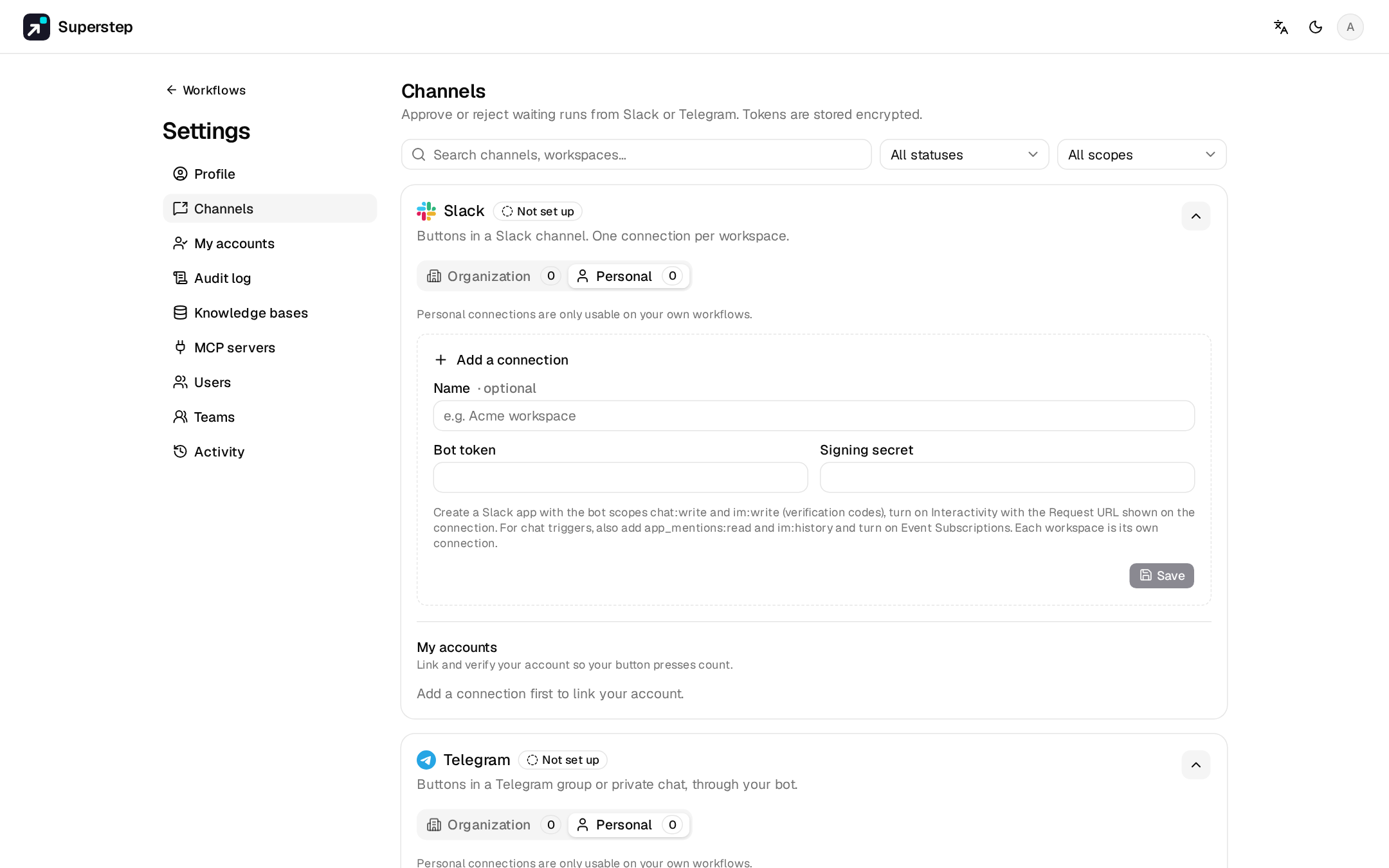
Approval channels carry a Human node's request outside the studio. Set them up under Settings → Channels; each person links their own chat account under Settings → My accounts. Each channel shows its platform's logo there, in the Human node's channel list and in Settings → Audit log.
| Channel | Kind | Needs |
|---|---|---|
| Slack | Buttons | Public HTTPS STUDIO_PUBLIC_URL, a Slack app |
| Telegram | Buttons | Public HTTPS STUDIO_PUBLIC_URL, a bot |
| Reply buttons | Public HTTPS STUDIO_PUBLIC_URL, a Meta app with WhatsApp |
|
| Links | STUDIO_PUBLIC_URL, SMTP_HOST |
|
| Microsoft Teams | Links in an Adaptive Card | STUDIO_PUBLIC_URL, a Workflows webhook |
A connection is personal (usable on your own workflows) or organisation-wide
(admins create those). For local development, a tunnel such as
cloudflared tunnel --url http://localhost:8000 or ngrok http 8000 gives a
public HTTPS URL.
Slack
- Create an app at https://api.slack.com/apps. Bot scopes:
chat:write,im:write, andchat:write.publicif the bot should post in public channels it has not joined. - Install it and copy the bot token (
xoxb-…) and the signing secret. - In Settings → Channels, paste both and save.
- Copy the request URL into Interactivity & Shortcuts:
POST {STUDIO_PUBLIC_URL}/api/approvals/callback/slack(routed byteam_id, so one person can connect several workspaces). - Invite the bot to the channel and use the channel id (
C…) on the node. - Each approver copies their Slack member id, receives a 6-digit code by DM, and verifies it under My accounts.
SLACK_CLIENT_ID, SLACK_CLIENT_SECRET and SLACK_SIGNING_SECRET enable
Add to Slack (OAuth). The redirect URL is
{STUDIO_PUBLIC_URL}/api/approvals/slack/oauth/callback. Pasting a bot token
still works when those are empty.
Telegram
- Create a bot with
/newbotat @BotFather and paste the token. Save. - Register webhook calls
setWebhookfor{STUDIO_PUBLIC_URL}/api/approvals/callback/telegram/{channel_id}(STUDIO_PUBLIC_URLmust be HTTPS). - Add the bot to the chat and use that chat id on the node.
- Each approver presses Start in the bot, then verifies their Telegram user id with a code.
The webhook is checked with X-Telegram-Bot-Api-Secret-Token.
Chat triggers
Slack and Telegram connections can also start workflows from a message. They need two more Slack scopes and an events URL, or a re-registered Telegram webhook: see Chat triggers.
WhatsApp (Cloud API)
- In a Meta app with the WhatsApp product, paste the access token, the phone number ID, the app secret, and a verify token you choose.
- In the Meta dashboard set the webhook to
{STUDIO_PUBLIC_URL}/api/approvals/callback/whatsapp/{channel_id}with that verify token (Meta checks it with a GET), and subscribe tomessages. - The node's target is a phone number in international form, digits only.
Callbacks are checked with X-Hub-Signature-256. WhatsApp delivers button and
text messages only within 24 hours of the person's last message to the number.
Outside that window, set Template name (and language) to an approved
template with body variable {{1}} and two quick-reply buttons (Approve,
Reject). Approvers verify their number with a code, which also arrives only
inside the 24-hour window. WhatsApp cannot edit a message, so the outcome is a
reply to the request.
E-mail and Microsoft Teams
These are link channels: the message has Approve and Reject links to
/approve?token=…. The person signs in to the studio and confirms there, so
there is no chat account to link, and opening a link (for example by a mail
scanner) decides nothing.
- E-mail uses the studio's SMTP settings (
SMTP_HOST, …). The node's target is one or more comma-separated addresses. - Teams: in the channel, add the Workflows template "Post to a channel when a webhook request is received", then paste its HTTPS URL. The node needs no target. The request is an Adaptive Card, and the outcome is posted as a second card.
Verification and limits
Clicks from unverified accounts are rejected (APPROVAL_IDENTITY_UNKNOWN). One
verified studio user owns a chat identity.
| Variable | Default | Meaning |
|---|---|---|
STUDIO_IDENTITY_CODE_TTL |
600 s | Lifetime of a verification code |
STUDIO_IDENTITY_CODE_ATTEMPTS |
5 | Tries per code |
STUDIO_IDENTITY_CODE_RESEND |
30 s | Wait before a code can be resent |
STUDIO_APPROVAL_TTL |
86400 s | Lifetime of a request's buttons and links |
STUDIO_CALLBACK_RATE_LIMIT_IP |
60 | Public callbacks per IP per window |
STUDIO_CALLBACK_RATE_LIMIT_CHANNEL |
300 | Public callbacks per connection per window |
STUDIO_CALLBACK_RATE_WINDOW |
60 s | The window |
Behind a proxy, STUDIO_TRUSTED_PROXIES lists the proxy CIDRs.
X-Forwarded-For is read from the right, skipping trusted hops, and only when
the direct peer is a trusted proxy.