Chat triggers
Event bindings (Telegram and signed JSON)
In this dialog choose Start from → An event (run as owner), an exact
group/place and allowed sender IDs separated by commas. An explicit * lets
everyone in that place spend the trigger owner's resources without a studio
account. Use a restricted group or sender list. Command bindings take priority
and keep requiring verified accounts. Each connection/place has one event binding.
Map event paths to declared state fields: message → data.text (string),
context → $ (object). The envelope contains id, source, type, time
(UTC ISO timestamp), actor.id, actor.name, conversation.id and data.
Telegram supplies original text and data.message_id. time is submission time,
not an expense date. Missing paths and mismatched types start no run. Both event
and mapped input are bounded by STUDIO_INPUT_MAX_BYTES. The workflow sends its
own processing/result replies through tools; the trigger sends no automatic
success reply. Callback rate limits apply. Event identity and queued run are
stored atomically. Concurrent retries reuse that run; after queue failure a retry
queues the original saved input. Normal run recovery applies after a restart.
For JSON, add Signed JSON webhook in Settings → Channels, with a secret
of 32–256 letters, digits, _ or -. It is inbound-only, unavailable for Human
approvals or account linking. Send to its callback URL:
{"id":"expense-001","type":"message.text","time":"2026-11-01T10:00:00+07:00","place":"expenses","sender":"employee-42","data":{"text":"Lunch 50000"}}
Bind exact place expenses, sender employee-42, type message.text.
Sign the raw bytes using the result webhook signature:
X-Studio-Signature: t=<unix-seconds>,v1=<hex-HMAC-SHA256(secret,"<timestamp>.<raw body>")>.
Signatures outside five minutes are rejected. A stable event ID suppresses replay
even after re-signing. Keep secrets in Settings; replacing a secret takes effect
immediately. Wrong place/sender/type, bot messages, edits, absent IDs/timestamps,
oversized data and disabled bindings start no runs. Telegram needs privacy mode
disabled to receive ordinary group messages. New event mode supports Telegram
and signed JSON; Slack command behavior is unchanged.
Command bindings
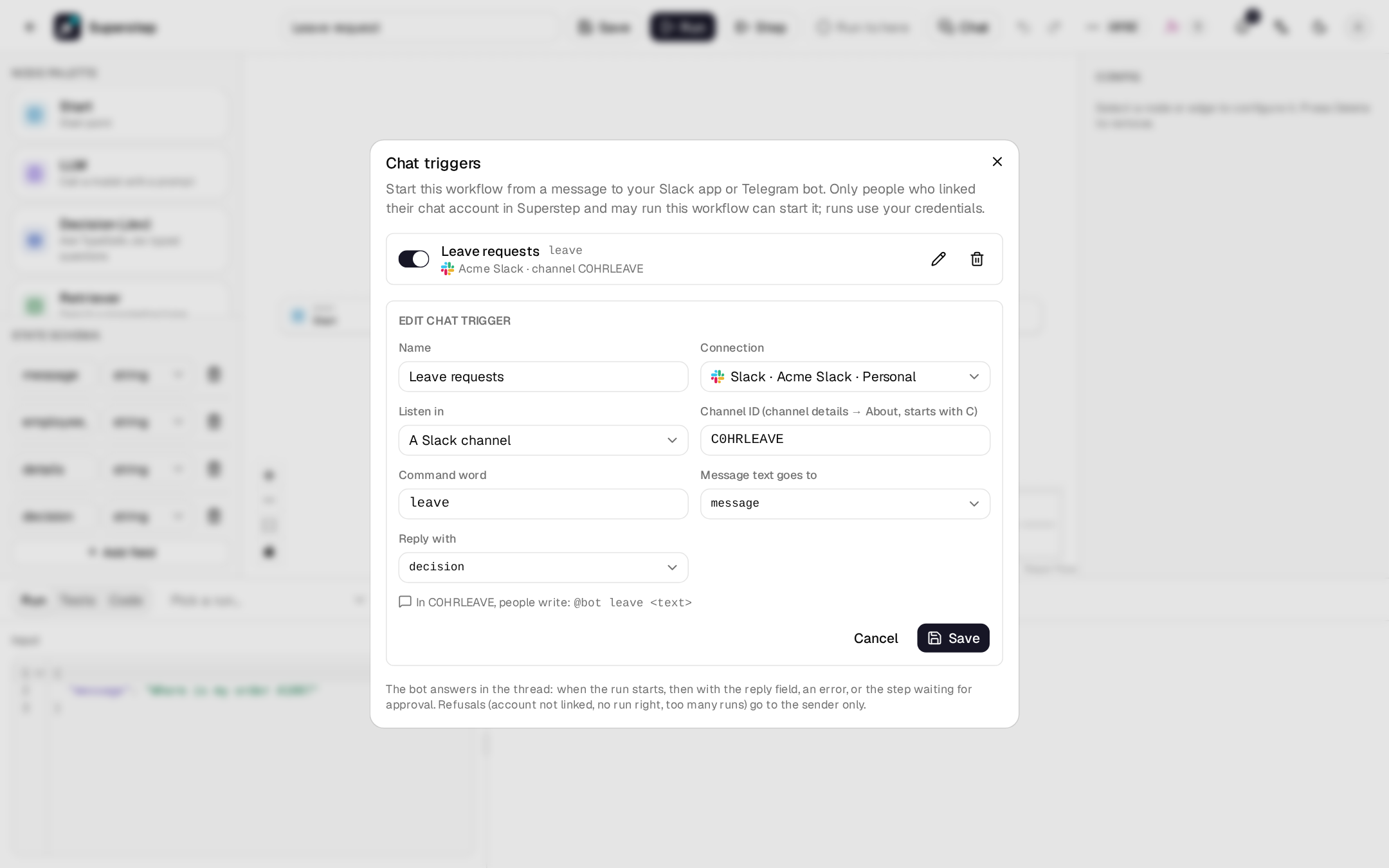
⋯ → Chat triggers in the editor starts the workflow from a message to your Slack app or Telegram bot. A command word picks the workflow, the rest of the message fills one input field, and the bot answers in the thread with one state field.
@bot leave 2 days off next week for a family trip
     ^^^^^ ^^^^^^^^^^^^^^^^^^^^^^^^^^^^^^^^^^^^^^^^
   command  goes into the input field
Before you begin
- Owner access to the workflow (its owner, or an admin).
- A Slack or Telegram connection under Settings → Channels that you may use (your own, or an organisation one when your role may use those). See Approval channels.
- A public HTTPS
STUDIO_PUBLIC_URLand the worker running: messages are queued as jobs. - Everyone who will write to the bot links and verifies their chat account under Settings → My accounts, and may run the workflow: its owner, an admin, or someone it is shared with (see Roles and sharing).
Set up Slack
A connection made before chat triggers existed needs these steps once.
- In the app's OAuth & Permissions, add the bot scopes
app_mentions:read(mentions in channels) andim:history(direct messages). Add to Slack asks for them already. - In Event Subscriptions, turn events on and paste the Event
Subscriptions Request URL shown on the connection under Settings →
Channels:
{STUDIO_PUBLIC_URL}/api/channels/events/slack. Slack checks it at once. One URL serves every workspace (routed byteam_id). - Under Subscribe to bot events, add
app_mentionandmessage.im. - For direct messages, in App Home allow users to send messages from the Messages tab.
- Reinstall the app to the workspace, then press Test connection. When the test finds a scope missing, the connection shows a warning, and triggers on it can only be saved turned off.
- Invite the bot to each channel it should listen in.
Set up Telegram
- Press Register webhook on the connection again. The bot then receives messages as well as button clicks, at the same callback URL.
- In a group, the bot only sees messages that start with
/(privacy mode). People write/leave …, or you turn privacy mode off with/setprivacyat @BotFather. - Add the bot to the group. The group id is negative (for example
-1001234567890): open the group in Telegram Web, and it is the number after#in the address.
Add a trigger
| Field | Meaning |
|---|---|
| Name | Shown in the list and in History. |
| Connection | A Slack app or Telegram bot from Settings → Channels. |
| Listen in | Direct messages to the bot, A Slack channel (its id, C…, from the channel details → About) or A Telegram group (its id, -…). |
| Command word | One word: letters, digits, - or _, up to 32 characters. Not case-sensitive; a leading / is dropped. |
| Message text goes to | The input field that receives the rest of the message. A list field gets a one-item list. |
| Reply with | The state field the bot shows when the run ends. |
The dialog shows what people will write. One command answers once per place:
the same word on the same connection and place is refused
(CHAT_TRIGGER_COMMAND_TAKEN), but it may be used in another channel, group,
or connection. The switch on each row turns a trigger off without deleting it.
A workflow has at most 20 chat triggers.
What people write
| Where | Message |
|---|---|
| Slack channel | @bot leave 2 days off next week |
| Slack DM | leave 2 days off next week |
| Telegram group | /leave 2 days off next week (or /leave@your_bot …) |
| Telegram DM | leave 2 days off next week or /leave … |
A colon or comma after the command works too (leave: 2 days). Messages from
bots, edits, joins and files are ignored, as are messages whose first word is
not a command of this place.
What the bot replies
In the message's thread (in a Slack DM, in the conversation; in Telegram, as a reply to it):
- Started:
▶️ Started Leave request (run 1a2b3c4d5e)as soon as the run is queued. - Finished:
✅ Leave request finished: …with the reply field, shortened to 3000 characters. - Failed:
❌ … failed: …with the error message. - Waiting:
⏸ … is waiting for approval at Manager reviewwhen a Human node pauses the run. The approval itself goes where the node sends it; after it, the bot answers again with the result. - Stopped:
⏹ … stopped (cancelled).
Each reply links to the run when STUDIO_PUBLIC_URL is set. The run appears in
History with a Chat badge, the platform's logo, the sender and the
trigger's name. The bot writes in the language of the sender's studio account.
Refusals
A refused message starts nothing. The reason goes to the sender only: a Slack
message only they see, or a Telegram direct message (in the group if they never
started the bot). Each refusal is written to Settings → Audit log as
chat_refused; started runs as chat_started.
| Reason | Code |
|---|---|
| The chat account is not linked | CHAT_IDENTITY_UNKNOWN |
| The chat account is linked but not verified | CHAT_IDENTITY_UNVERIFIED |
| The linked user may not run the workflow | CHAT_FORBIDDEN |
| The trigger is off | CHAT_TRIGGER_OFF |
| Too many runs from this sender with this command | RATE_LIMITED |
The message is larger than STUDIO_INPUT_MAX_BYTES |
RUN_INPUT_TOO_LARGE |
| The workflow was deleted | WORKFLOW_NOT_FOUND |
Security and limits
- Who may run: only senders whose chat account is linked and verified, and whose studio user has the run right. The run is owned by that user.
- Whose resources: the run uses the workflow owner's credentials, knowledge bases and MCP servers, as every run of a saved workflow does.
- Requests: Slack events are checked with the signing secret, Telegram updates with the webhook's secret token. A delivery retried by the platform starts nothing new.
- Rate limit:
STUDIO_CHAT_TRIGGER_RATE_LIMITruns per sender and trigger (default 60,0off) perSTUDIO_TRIGGER_RATE_WINDOWseconds (default 60). - Stopping: deleting the connection turns its triggers off; a trigger also turns itself off when its creator can no longer manage the workflow. Deleting the workflow deletes its triggers.