Code mode
A Tool node in Code mode runs Python or TypeScript you write in the node.
The code defines main(state); its return value goes to the node's
output_field.
def main(state):
    print("seen:", state["message"])   # shown in the trace, not stored in the state
    return state["message"].upper()
Before you start
Code mode is off until the server sets STUDIO_ENABLE_CODE_NODES=1 and
has the sandbox image. An admin sets that up: see
Code runtime. While it is off, a workflow
with a Code node fails validation and says why.
Write and test
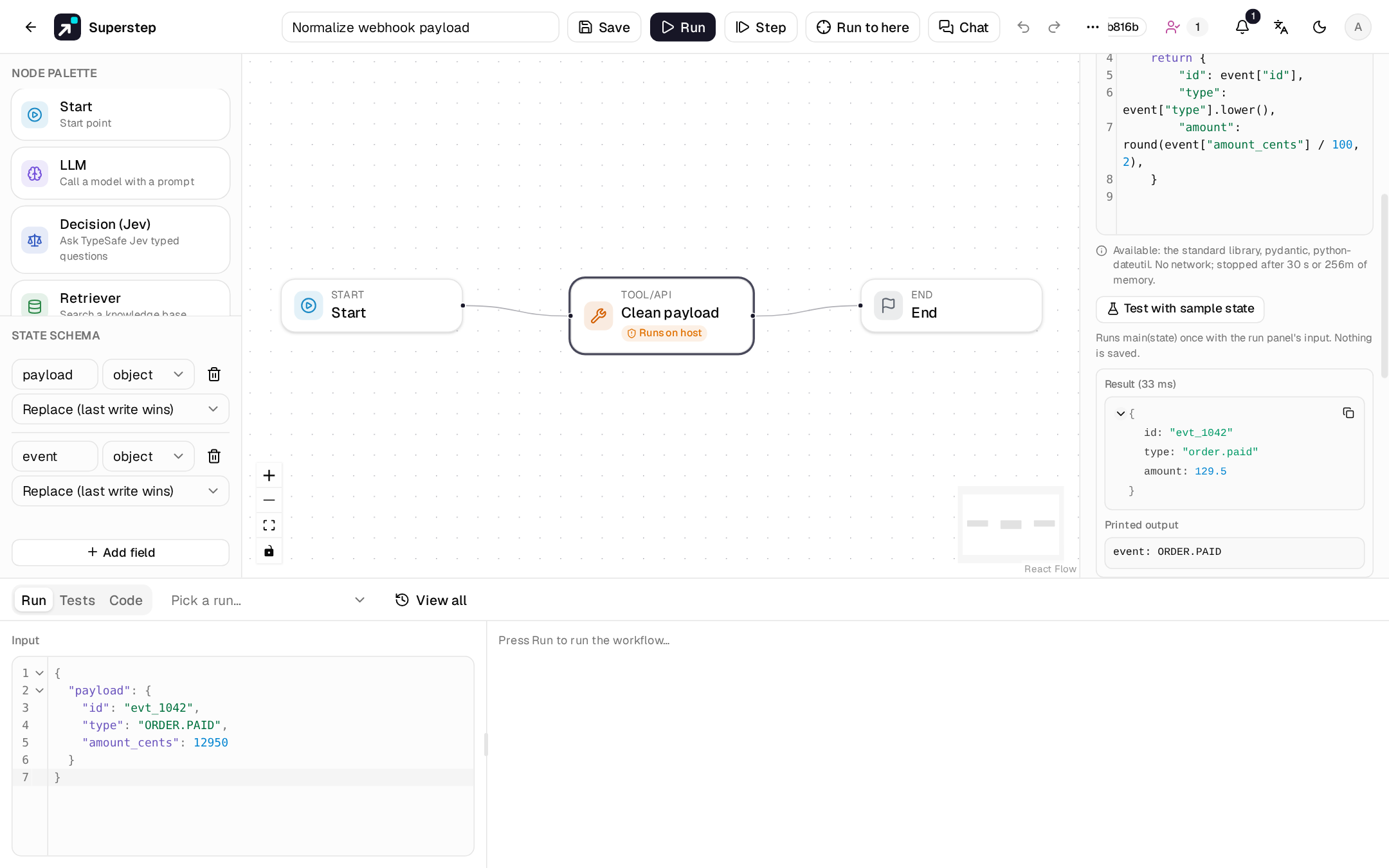
- Select a Tool node and set Mode to Code (Python) or
Code (TypeScript). The field starts with that language's
main(state)stub (see TypeScript). Mode only lists the languages this server can run. - Below the editor, the node lists the packages in the image and the limits.
- Put sample input in Input in the bottom panel's Run tab.
- Press Test with sample state. It runs
main(state)once with that input and saves nothing. The result shows the returned value, the printed output and, on failure, the traceback with your own frames only. - Save and run as usual.
Tests go through POST /api/code/test, limited to
STUDIO_CODE_TEST_PER_MINUTE calls per user per minute (default 20).
The contract
| Rule | Detail |
|---|---|
| Entry point | A function named main that takes one argument, the state. |
| Input | A JSON copy of the state. Changing it does not change the run. |
| Output | The return value, which must be JSON: a dict, list, string, number, bool or None. |
| Printed output | print() and stderr go to the trace, at most 64 KB (longer output is cut). |
| Size | Source at most 64 KB; state and result at most 1 MB each. |
| Packages | The standard library plus what the image has: pydantic and python-dateutil in the default image. |
| Network, files | None. The container has no network, a read-only root and a 64 MB /tmp. |
| Time | The node's timeout, capped by the server's maximum (30 s by default). |
The code changes the run only through its return value.
TypeScript
Set Mode to Code (TypeScript). If you have not changed the code yet, the stub becomes the TypeScript one; edited code is kept, and the node asks you to rewrite it. The canvas marks the node TS.
export function main(state: State) {
  console.log("seen:", state.message)   // shown in the trace
  return (state.message ?? "").toUpperCase()
}
- Entry point: export a function
main, sync orasync. State: a type generated from the workflow's state schema, shown above the editor. Typestate.to complete field names. TypeScript runs on Deno, which removes types without checking them, so a type error does not stop the run and you need not declareState.- Printed output:
console.logand the otherconsolemethods. - Output: the value must be JSON.
undefined, aBigInt, a function or a cycle givesCODE_RESULT_NOT_JSON. - Packages: Web APIs (
fetchaside, see below), plus the packages the server allows, imported as written in the list under the editor, for exampleimport { z } from "npm:zod@3". The default image hasnpm:zod@3andnpm:date-fns@4. Write the version as listed:npm:zodwithout one, or another major, isCODE_INVALIDwith the allowed spec in the message, and so is any other import. - No permissions: reading or writing files, the network, environment
variables, starting processes and system information all fail with
NotCapable(CODE_FAILED), on every runtime. - The same size, time and memory limits as Python apply.
Failures
| Code | When |
|---|---|
CODE_INVALID |
Syntax error, or no callable main. |
CODE_FAILED |
main raised. The trace shows the traceback. |
CODE_RESULT_NOT_JSON |
The return value is not JSON. |
CODE_TIMEOUT |
The call ran past its time limit. |
CODE_MEMORY |
The container hit its memory limit. |
CODE_TOO_LARGE |
Source, state or result over the size limits. |
CODE_RUNTIME_OFF, CODE_RUNTIME_UNAVAILABLE |
Code mode is off, or Docker or the image is missing. |
CODE_LANGUAGE_UNSUPPORTED |
The node's language is not offered on this server. |
CODE_WRITE_FORBIDDEN |
You lack code.write. Switching the language counts as changing the code. |
The node's retry settings apply to failures. A cancelled run kills its container.
Who may write code
Only roles with code.write (admins, by default) may add a Code node or
change its code, whether by a save, a version restore, or a template import
or use. Editors can still open, run, move, rename and delete Code nodes and
duplicate a workflow that has one; for them the code is read-only and the
test button is hidden.
In the trace
The node's row carries code_output: the printed output, the runtime and
the duration. A failure shows the traceback. A call takes about 0.3 s on a
warm image.