Nodes
| Node | Purpose | Writes to |
|---|---|---|
| Start, End | Entry and exit of the graph | — |
| LLM | Call a model with a prompt template | output_field |
| Agent | A model that picks and calls the tools you allow, until it answers | output_field, steps_field (optional) |
| Decision (Jev) | Typed answers from TypeSafe Jev | one field per question, plus output_field |
| Retriever | Search a knowledge base | output_field (list) |
| Tool | Python function, HTTP request or your own Python code | output_field |
| MCP tool | Call a tool on an MCP server | output_field |
| Send email | Send one e-mail over SMTP | output_field (optional) |
| Condition | Pick one outgoing edge by a field's value | — |
| For each | Loop over a list, one item at a time | item_field, index_field |
| Human | Pause until a person answers | output_field |
| Join | Wait for every incoming branch | — |
| Subgraph | Run another saved workflow inside this one | shared fields |
| Code (imported) | Read-only node from an imported repo | — |
Config tabs
Select a node and the Config panel shows its type, id and Label, then the same three tabs for every node, always in this order:
| Tab | What you find there |
|---|---|
| Settings | What the node does: credential, model, prompts, tools, mode, code, approvers and deadline. |
| Data | Every choice of a state field: the output field, an Agent's steps and history fields, a loop's fields, the field a Condition branches on, a Decision's answer fields, and Input fields. |
| Execution | How the node runs: retry, timeout, cache, and limits such as an Agent's max rounds or a loop's max items. |
A tab the node does not use stays in its place, greyed out. The panel keeps the tab you chose when you select another node, so you can open Data and click through the graph to see where each node writes. A red dot on a tab means something there needs attention, such as a missing output field.
Execution settings
LLM, Agent, Decision, Retriever, Tool, MCP tool and Human nodes have these settings in their Execution tab:
| Setting | Effect |
|---|---|
| Retry attempts | LangGraph retry policy: how many times to try the node. |
| Wait between tries (seconds) | Initial interval between attempts. |
| Timeout (seconds) | Stops that attempt; a retry starts it again. |
| Cache TTL (seconds) | LangGraph node cache: the same input within the TTL reuses the result. |
Blank means off.
Start and End
Every graph has exactly one Start. End nodes close a path. Neither can be deleted or copied. Start receives the run input as the initial state.
LLM
| Setting | Notes |
|---|---|
| Credential | A provider from Credentials. Blank uses OPENAI_API_KEY, and without that the offline mock. |
| Model | Picked from the provider's model list, or typed. |
| Prompt template | Text with {{state.field}} references and filters. |
| Output field | The state field that receives the reply. |
| Include attachments | Sends the chat's files in the files field (files by default) to the model: documents as text after the prompt, images as images when the model can see them (other models get a note naming the image). See Attachments. |
While a run is going, token deltas arrive as node_token events and show in
the Logs row and the Output tab. They are not stored in run history; the final
text is. Provider failures (401, timeout and so on) become a node error
event, never a server crash.
Fallback model
In an LLM node's Settings, enable Use a fallback model and choose its credential and model. The pair must differ from the primary. The alternate credential is checked using the workflow owner's access before either model is called; only chat-model credentials are accepted.
The primary is tried first. An unreachable provider, missing model or bad provider response can select the alternate once. Authentication/configuration and credential-access errors stop the attempt. Cancellation or an expired node timeout never starts the alternate. Node retry settings repeat the whole policy, so keep their attempt count in mind when estimating usage.
With fallback enabled, answer text is held until a model succeeds, then emitted
as a completed chunk. Ordinary LLM nodes still stream live. The trace's
model_attempts records provider/model, status and error code; a failed call
can still incur provider charges even if it reports no usage. Mock runs remain
offline and do not resolve credentials. Code exports currently reject a workflow
with a configured fallback policy (MODEL_POLICY_EXPORT_UNAVAILABLE) rather
than silently omitting it. Portable templates clear the fallback credential;
select your own credential after import.
Agent
A task prompt, a list of tools (MCP, HTTP, built-in function, knowledge base search) and a maximum number of rounds. The model calls tools until it answers; a tool can need a person's approval before each call. See Agent node.
Decision (Jev)
Asks TypeSafe's Jev typed questions about text (a
template; an exact {{state.x}} sends the value with its type). Each question
has an id, instructions and a type:
| Type | Settings | Answer |
|---|---|---|
choice |
2–255 options |
one option label |
score |
2–10 levels, low to high |
a number from 0 to the last level index; it can fall between levels |
noul |
— | a number from 0 (false) to 1 (true) |
A question's field receives its answer, so a Condition can branch on a
choice. output_field (an object) receives every answer with its
probabilities and confidence. The node uses a TypeSafe credential, then
TYPESAFE_API_KEY, then offline sample answers (a choice picks the first
option named in the text). Usage is priced at $0.042 per million input tokens;
output tokens are free. A recovered run reuses its answers.
Retriever
| Setting | Notes |
|---|---|
| Knowledge base | One of your knowledge bases. |
| Query | A template, usually {{state.message}}. |
| Top K | 1–20 results. |
| Output field | Receives a list of {text, score, filename, …}. |
Tool
A Tool node has three modes.
Calls a Python function registered with @register_tool in
backend/app/engine/tools.py, for example lookup_order. GET /api/tools
lists what is registered. A function that declares an idempotency_key
parameter receives the node's key.
method, url and a templated body. The URL must resolve to a public
address: loopback, private, link-local and metadata addresses fail with
HTTP_TOOL_URL_BLOCKED unless STUDIO_HTTP_TOOL_ALLOW_PRIVATE=1. The
request goes to the checked IP, does not follow redirects, and times out
after STUDIO_HTTP_TOOL_TIMEOUT seconds (default 30). It carries
Idempotency-Key, X-Studio-Run-Id and X-Studio-Attempt.
Your own main(state), run in a sandbox. See Code mode.
MCP tool
server_id, tool, arguments and output_field. Argument strings are
templates; an argument that is exactly one {{state.x}} keeps the value's
type, so {{state.items | length}} passes a number. See MCP servers.
Send email
Sends one e-mail through an SMTP credential (Credentials → SMTP: host, port, STARTTLS / SSL / none, user name, sender; the password is stored encrypted).
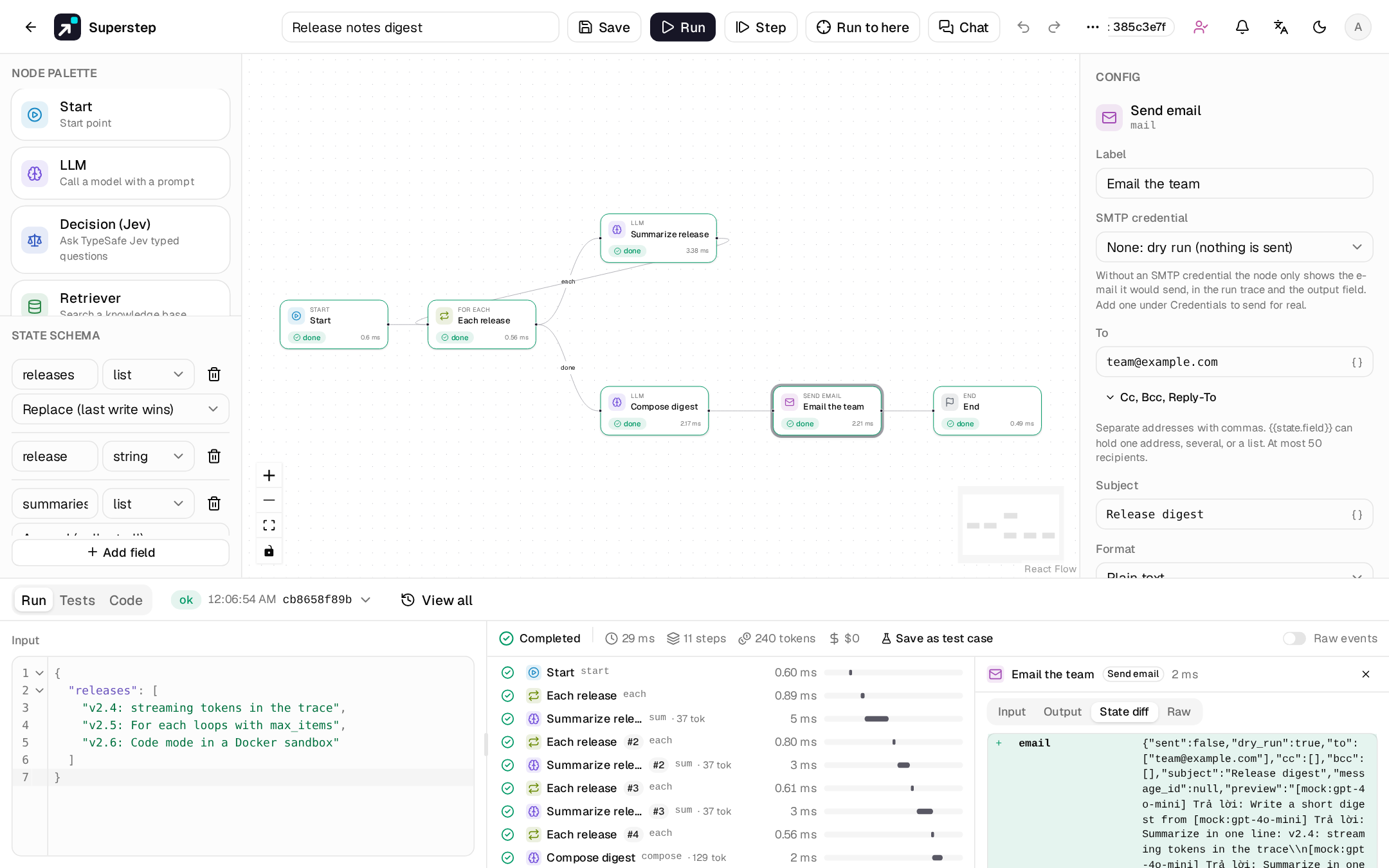
to,cc,bccandreply_toare templates with comma-separated addresses; one{{state.x}}may also hold a list. At most 50 recipients.subjectandbodyare templates. With format HTML, values from the state are escaped and a plain-text part is added.output_field(optional, an object) gets{sent, dry_run, to, cc, bcc, subject, message_id, refused}.- Without a credential the node is a dry run: nothing is sent, and the
result holds the message with a text
preview. - A recovered run never sends again, and the
Message-IDcomes from the node's idempotency key. - Private or loopback SMTP hosts need
STUDIO_SMTP_ALLOW_PRIVATE=1(for example Mailpit onlocalhost:1025). - Each workflow owner's nodes reach at most
STUDIO_EMAIL_NODE_HOURLY_LIMITrecipients per hour (default 100).
Put a Human node before it to approve a drafted e-mail.
Condition
Set Field to a state field. Outgoing edge labels are matched against its value:
- exactly;
- case-insensitively, after trimming spaces and punctuation;
- as a whole word in the value, where the longest label wins.
Label order does not matter: Disapprove. picks disapprove, not approve.
Two whole-word labels of the same length are ambiguous. The optional
default edge is the fallback for no match or an ambiguous one.
A Condition is the only node that may have an edge back to itself, and the only way (with For each) to close a loop.
Parallel branches
Several outgoing edges from a node that is not a Condition run in the same
superstep. A state field written by more than one branch needs a reducer
(append, merge or add); a missing reducer fails validation. Use a
Join to wait for all branches.
For each
| Setting | Notes |
|---|---|
items_field |
A list field to loop over. |
item_field |
Receives the current item. |
index_field |
Optional, integer or number: the 0-based index. |
max_items |
1–1000, default 100. A longer list fails the node. |
It needs two outgoing edges labelled each and done; the editor labels the
first edge you draw each and the second done. The each branch is the
loop body and must lead back to the For each node. Every visit writes the
next item and follows each; after the last item it follows done.
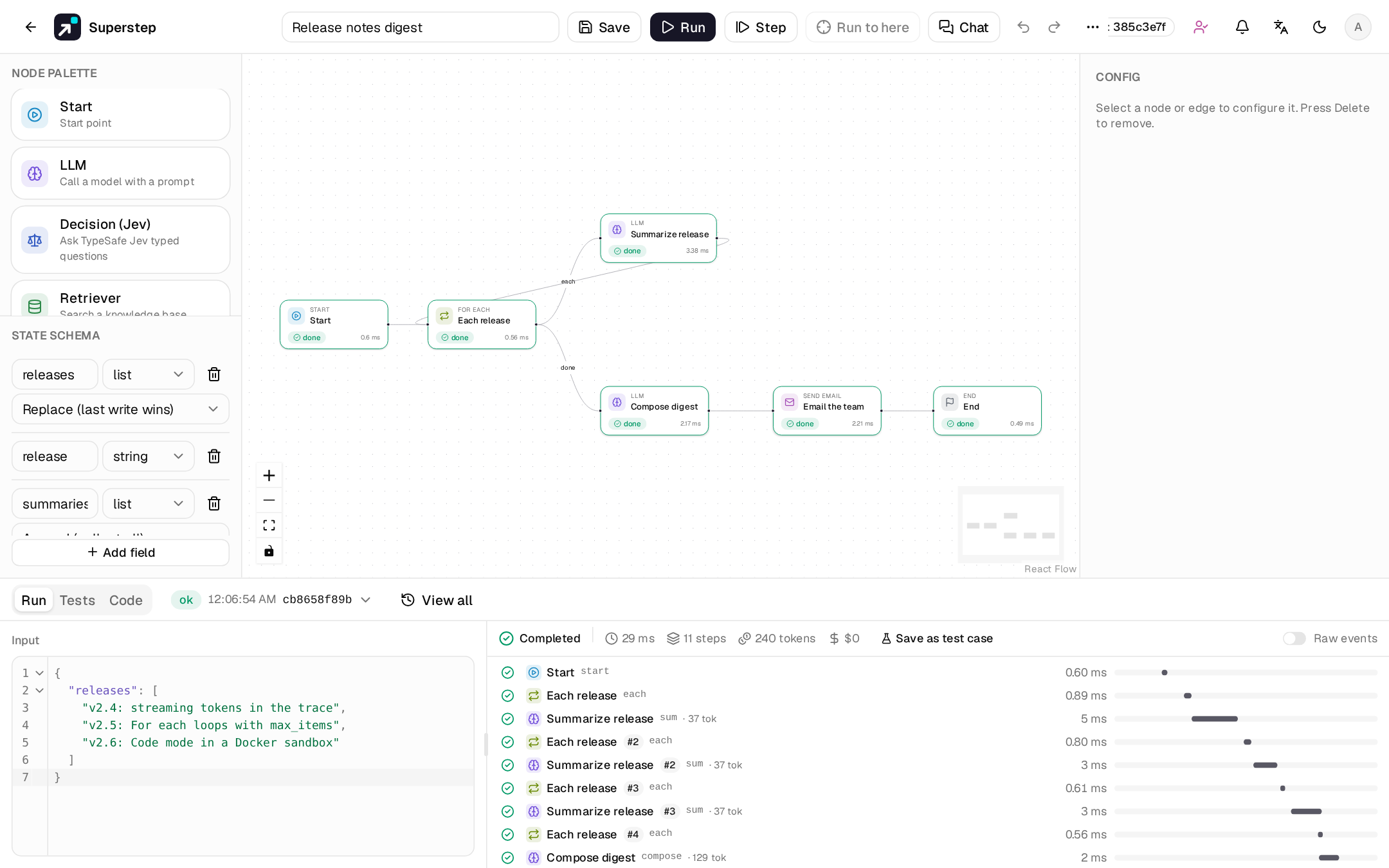
Items run one at a time, so Human pauses, recovery and idempotency keys work
per item. Collect results in a list field with the append reducer. Loops can
nest; the inner list starts again for every outer item. Loop steps do not use
up STUDIO_RECURSION_LIMIT, which only bounds the other loops.
Human
prompt (a template) and output_field. The run waits in status waiting
until someone answers Approve (approved), Reject (rejected) or
free text. See Human approval.
A model can review the request first, as a suggestion or answering on its own: see
AI review of approvals.
Join
Waits for every incoming branch, then runs once. It needs at least two incoming edges and cannot take an edge straight from a Condition.
Subgraph
workflow_id of one of your saved workflows. State is shared by field name.
Inner nodes appear in the trace as Subgraph › node (id sub/node). Cycles,
a missing or imported child, and nesting deeper than five levels fail on save
and on run (WORKFLOW_INVALID).
Code (imported)
Read-only nodes produced by repo import. The right panel shows the original source. Editing the canvas does not change the imported file.