Google Drive managed connection
Under Settings → MCP, add a Managed connection → Google Drive files. Set one Allowed folder ID and paste the Google credential JSON. Save, then Discover tools and use them from an existing MCP node or Agent slot. No new canvas node is needed. Discovery is offline; a real call verifies the folder and its Google permissions.
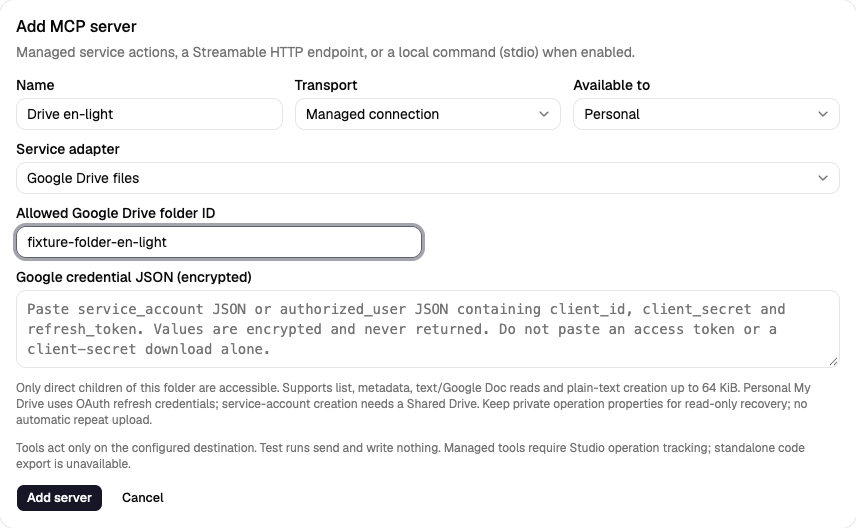
Choose credentials
Enable the Google Drive API in your Google Cloud project. Credentials are encrypted, never returned and blank on edit; leaving a stored value blank keeps it. Do not put keys/tokens in workflow JSON or paste real credentials in chat.
Personal My Drive: use pre-provisioned OAuth credentials with offline access and Drive permissions. The JSON format is:
{
  "type": "authorized_user",
  "client_id": "YOUR_CLIENT_ID.apps.googleusercontent.com",
  "client_secret": "YOUR_CLIENT_SECRET",
  "refresh_token": "YOUR_REFRESH_TOKEN"
}
An access token alone or the downloaded web/installed client-secret JSON is
not enough: complete Google's consent flow with offline access first. This
adapter refreshes the existing grant at Google's fixed token endpoint; it does
not add scopes or provide an interactive consent screen. General folder reads
need an appropriate drive.readonly or drive grant; creation needs write
access such as drive. A narrower drive.file grant only sees files/folders
authorised for that app. OAuth consent/verification, testing-app token expiry
and revocation remain Google application setup. Follow Google's
offline access guide.
Service account: paste the full JSON key (with type: "service_account",
client_email and RSA private key) and grant it access to the configured folder.
Service-account calls use the Drive scope without delegated-user impersonation.
They can read accessible shared folders, but creation requires a Shared
Drive, detected from the folder metadata. Google service accounts have no
personal storage quota and cannot own My Drive files; sharing an ordinary
My Drive folder as editor does not remove that restriction. See
Google's storage/ownership rules.
For either credential type, the Google identity must be allowed to read the folder; creation also requires permission to add children and available storage. Shared Drive organisation restrictions still apply. Studio checks its own personal/organisation connection policy before using the grant.
Folder boundary and tools
Copy the folder ID from its Drive URL, not the whole URL. root is not accepted.
The connection grants access to direct, non-trashed children only. There is
no recursive search, shortcut following or arbitrary download-URL fetch.
Changing the folder invalidates old operation reconciliation; restore the
original folder before checking an old result. External moves/edits are not
locked by Studio.
| Tool | Arguments | Result |
|---|---|---|
list_files |
Optional name_contains, page_size (1–100, default 25), page_token |
Bounded metadata page and next_page_token; name search is escaped, no raw query |
get_file |
file_id |
Allowed child's ID, name, MIME type, size/time/link when available |
read_text_file |
file_id |
Metadata plus UTF-8 content; plain text types/JSON/XML or Google Doc exported as text |
create_text_file |
name, content |
A confirmed plain-text file receipt in the configured folder |
Text reads/uploads are at most 64 KiB UTF-8, names at most 200 characters, search text 200, list pages 100 items and HTTP responses 64 KiB. A very large metadata page may require a smaller page size. A whole argument object is at most 128 KiB UTF-8 JSON. Native Google Docs export is plain text; PDFs, binary files, updates/deletes/moves/sharing and resumable uploads are not included. Returned file content is untrusted data. Configured credentials/access tokens are redacted from results; response headers/raw errors are never returned.
To save a generated response, select create_text_file, map name to
report.txt and content to {{state.answer}}, and write the result to an object
state field such as created. A following read_text_file can use
{{state.created.file.id}}. For downstream confirmation, check
state.created.outcome == "confirmed" in the existing Code/Condition pattern.
An Agent's instructions must also require a confirmed receipt before claiming
that the file was saved.
Creation outcomes and recovery
Studio records an intent before calling Google. Each created blob has two
private appProperties: a hashed operation key and a SHA-256 content checksum.
The initial receipt checks folder, MIME type, marker, content hash and Drive's
blob MD5 checksum. A lost/malformed response or worker crash may leave an
unknown outcome. Repeating the same operation or pressing Recent operations
→ Check external result performs only a bounded marker lookup and reads the
matching bytes to verify the stored hash; it never uploads again.
No match, multiple matches, incomplete/paginated lookup or changed file content stays unknown. A crash before upload can therefore remain blocked even when no file exists. Preserve the private properties, keep the original folder and use the same Google app/account for recovery. Private properties are app-specific: switching OAuth apps/accounts can hide them. Never start a new run merely to bypass uncertainty; inspect the folder/provider first. Marker/hash checks are not a universal external exactly-once guarantee. See Drive private file properties and multipart uploads.
Confirmed operations reuse their durable result. Test/mock runs do no network, token exchange or file creation. Standalone code export keeps managed steps as TODO placeholders that throw until implemented with your own credentials and operation tracking outside Studio.
Repository acceptance fixture
From backend/, run .venv/bin/python -m pytest -q tests/test_managed_drive.py.
From frontend/, run
E2E_DRIVE_FIXTURE=1 npm run e2e -- managed-drive.spec.ts.
The explicit browser fixture replaces Google HTTP only, uses synthetic OAuth
credentials and creates in-memory files. It is never the production entry point
and performs no live Drive changes. Normal browser runs skip these four fixture
variants. Backend tests cover service-account/Shared Drive and OAuth/My Drive,
export, scope violations, lost responses, crashes and read-only recovery.